All Features

Everything your booking business needs

A complete, end-to-end booking platform. From the first click to the final payment — Clickobook handles it all.

AI-Powered Quoting & Forms

How AI-generated booking & quoting forms work

Describe your service in your language — Clickobook's AI builds the complete booking or quoting form for you in seconds.

  1. 1

    Describe your service

    Write one sentence — e.g. "Hair salon, haircuts from $30, ask about allergies and preferred stylist."

  2. 2

    AI builds the form

    The AI generates a complete booking or quoting form — services, intake questions, options and dynamic pricing logic that produces a live quote.

  3. 3

    Review & customize

    You keep full control — edit questions, options, prices and conditional logic before anything goes live.

  4. 4

    Publish & get booked

    Share your booking link page or embed the widget. Customers complete the smart form in seconds.

Every form is yours — AI drafts it, you decide what goes live.

Explore the AI booking & quoting form generator
Recurring Subscriptions

Smart auto-booking and intelligent reschedule

Recurring bookings become fully autonomous. After one of your customers activates a subscription, Clickobook automatically manages all future sessions — no manual work required.

1

Automatic booking at the chosen slot

Every recurring session is created exactly at the day and time the customer selected when the subscription was activated — no matter the billing interval.

2

Intelligent reschedule

If the preferred slot is unavailable, Clickobook automatically looks for the closest available alternative with the same staff member — the nearest time on the same day first, then next few days — always as close as possible to the customer's preferred slot, with automatic email and SMS notification so no one is left guessing.

3

Automatic credit fallback

When no compatible slot exists, the system automatically grants the customer a credit toward their next booking — so the value of the subscription is never lost.

4

Tenant-level configuration

Each business sets its own subscription rules: which billing intervals are offered and which services are included. The autonomous reschedule and credit engine then runs consistently for every subscriber.

Billing intervals: Daily Weekly Every 2 Weeks Monthly Every 6 Months Annually
A First in the Booking Industry

The only platform where subscription sessions are never lost

Every session your customers pay for keeps its value — so they stay subscribed and your recurring revenue stays predictable. Your customers can reschedule one-time and subscription bookings themselves, and no session ever becomes a lost one. No other booking platform does both.

Clickobook

Your customers reschedule anything. Sessions are never lost.

No session is ever wasted. Your customers reschedule one-time and subscription bookings themselves from the customer portal, and when no compatible slot exists the system keeps the session's value automatically. Fewer refund requests, fewer lost memberships, and steady recurring revenue.

Elsewhere in the market

Competitors can't match it

  • Other platforms block customer rescheduling of membership bookings entirely — staff must handle it manually.
  • Other platforms have no direct reschedule: customers must cancel and rebook, which consumes a session from their pass that is never returned.
  • Others have no membership feature at all — only packages and credits workarounds.

Online Booking and Scheduling

Give your customers a frictionless booking experience 24/7 with a full-featured scheduling engine.

Branded online booking page with your domain
One-step booking flow
Real-time slot availability with instant confirmation
Multi-booking in one session — book multiple services at once
Recurring appointment scheduling (daily, weekly, every 2 weeks, monthly, every 6 months, annually)
Advance booking windows (min / max days ahead)
Booking link shortener and QR code generation
Embeddable booking widget for any website
Multi-booking per slot
Dynamic time-slot generation based on staff availability
Buffer and break time configuration between appointments
Calendar view with daily, weekly, and monthly layouts
Subscription-based recurring bookings with auto-generation
Location-based booking with per-location pricing and availability

Services, Products & Categories

Build your complete service catalogue with flexible pricing, options, and intelligent forms.

Unlimited service categories with publish/unpublish controls
Products/services with base pricing, descriptions, duration, and images
Category-level questions with dynamic price modifiers (flat or percentage)
Product-level questions/answers with price modifiers
Answer-based dynamic pricing — prices change based on customer selections
Multi-select answers for multiple-choice questions
Custom option groups with option values and price modifiers
Required vs optional questions/options
Service packages and bundles (Plans)
Optional product surcharge when a plan or membership is selected
Category-level and product-level image galleries
Location-based price overrides at product and category level
Price range calculation (min/max) based on options and answers
Service visibility and ordering controls
Product surcharge when bundled inside a plan/membership

Staff & Team Management

Manage your entire team from a single dashboard with granular control.

Per-staff individual weekly schedules
Individual time slots per staff member
Per-staff duration overhead — each team member can add their own setup time on top of the same service duration
Customer-selectable or auto-assigned staff based on availability
Role-based access with default Manager, Operator, Receptionist. Create additional custom roles with granular permissions.
Performance dashboards per staff member
Staff calendar and daily agenda view
Staff categories for filtering and display on booking page
Break time and buffer time configuration per staff
Staff notifications for new and rescheduled bookings
Google Calendar two-way sync for staff
Staff-specific working hours and availability rules
Staff color coding on calendar

Payments & Revenue

Get paid online, automatically, with zero friction and full flexibility.

Stripe and PayPal payment integration
Full payment or pay later options
Deposit and partial payments
Recurring membership subscriptions (Stripe & PayPal)
Automated VAT/tax calculation with configurable rates
Discount codes and promotional pricing (percentage or fixed)
Coupon management with expiration dates
Revenue and payout tracking dashboards
Automated billing and invoice generation
Partial and full refunds for Stripe and PayPal payments, directly from the admin panel
Additional charges on bookings (overruns, extra services) added directly from the admin panel
Send payment links to customers instantly via WhatsApp, email, or Telegram
PCI-DSS compliant secure payment handling
Price modifiers based on booking options, answers, and add-ons
Promotion code support in checkout

Reminders & Notifications

Reduce no-shows and keep everyone in the loop automatically.

Automated email reminders
SMS reminder integration
Confirmation emails on booking, edit, and cancellation
Follow-up emails after appointments
Custom email templates with full HTML controls
Staff notification emails for new bookings and changes
Admin alerts for cancellations and rescheduling
Configurable sender name and reply-to address
Calendar invite attachments in emails
Webhook-based third-party notification push
Batched daily digest emails for staff
In-app notification center with read/unread status
Mark all notifications as read
Delete individual notifications

Customization, Forms & Dynamic Pricing

Tailor every part of the booking experience to your brand and business model — including instant quoting forms that calculate a live price from every answer.

Custom intake questions per category
Answer-based dynamic price modifiers — flat fee or percentage
Option-based price modifiers and add-ons
Automated quoting engine based on form answers and options
Instant quote & estimate forms — customers see a live price as they answer
AI-generated booking and quoting forms from a simple description
Required vs optional questions with conditional logic
Bring your own domain (e.g. yourdomain.com or booking.yourdomain.com)
CSS & color theme customization
Booking page language localization
Service image galleries
Custom cancellation policy and independent book/reschedule/stop-subscription controls
Terms and conditions acceptance checkbox on booking
Manual translation management per locale

Customers & CRM

Build lasting relationships with a powerful customer management system.

Customer database with full profiles
Customer tags for segmentation and filtering
Private notes on customer profiles
Customer booking history with status and value
Total spent, average booking value, and bookings per customer
Customer portal — login, view bookings, manage profile
Customer self-service with tenant control — enable/disable customer cancel, reschedule, stop subscription and reviews independently
OTP-based login (two-factor auth for customers)
Marketing consent tracking (GDPR-ready)
Send emails to customers directly from admin panel
Email preview before sending
Bulk customer import via CSV
Customer export to CSV with all metrics
Filter customers by tag, bookings, search
Sort customers by name, date, bookings count, total spent
Staff-scoped customer view (staff only sees their own customers)

Roles & Permissions

Granular access control so every team member sees only what they need.

Pre-built system roles: Manager, Operator, Receptionist, Staff
Custom roles with granular permissions
Create unlimited custom roles with custom permissions
Schedule, plans, customers, reports, settings, transactions permissions
Coupons, reviews, widget, layout, and translations permissions
Booking-level permissions: view, create, edit, delete, confirm, complete, cancel, export
Staff-level permissions: view, create, edit, deactivate, schedules, time-off
Product/category permissions: view, create, edit, delete, toggle publish
Per-user role assignments
System roles protected from editing or deletion
Role usage count — see how many users have each role

Reporting & Analytics

Data-driven insights to grow your business intelligently.
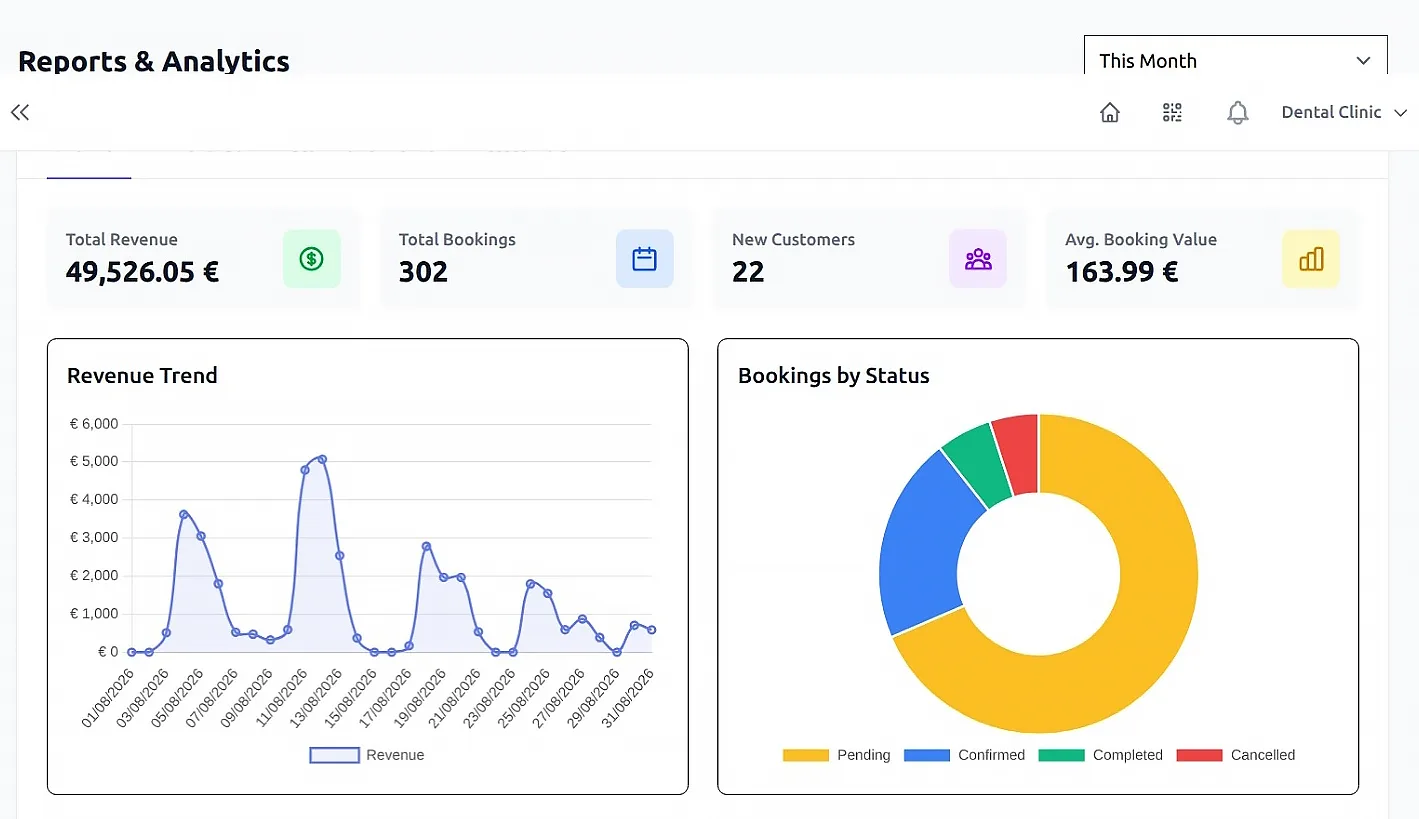
Real-time booking and revenue dashboards
Revenue trend and booking-status distribution charts
Date range filtering — today, yesterday, week, month, and custom (up to 1 year)
Overview KPIs — total revenue, total bookings, new customers, average booking value
Revenue breakdown by category and by location
Popular services and top customers rankings
Hourly peak-hours heatmap
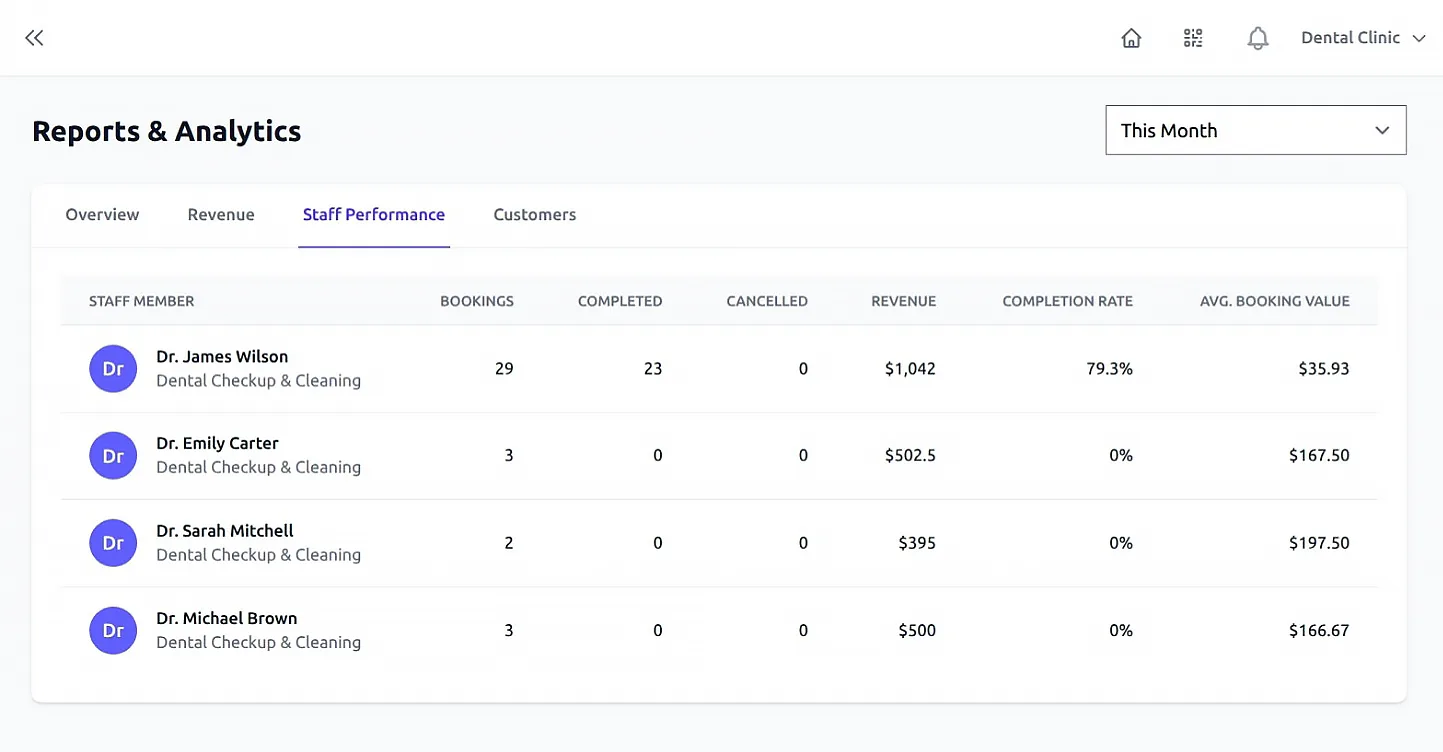
Staff performance — bookings, completed, cancelled, revenue, and completion rate
Customer insights — new customers, returning rate, and lifetime value
Refund tracking with gross and net revenue
Per-staff daily schedule digest emails
Revenue and booking analytics reports
Revenue, trends and staff analytics in detailed reports.
Staff performance table showing bookings and revenue per team member
See exactly how each team member is performing.

Integrations & Extensibility

Connect your booking system with the tools you already use.

Embeddable booking widget (iframe or script loader)
Google Calendar sync — one-way on Pro, two-way on Enterprise
Webhook system — push events to any URL on booking actions
Webhook events (booking created, updated, cancelled, completed)
Webhook delivery logs with status, attempts, and error tracking
Automatic webhook retry on failure
Stripe and PayPal payment gateway integration
SMS reminder integration
Cloudflare Turnstile protection on your contact page
REST API for custom integrations
Calendar invite (.ics) attachments in emails

Settings & Configuration

Full control over every aspect of your booking business from one place.

General settings: business name, address, timezone, locale
Configurable tax rates
Enable "Stripe Tax" for automatic tax collection. Can be used for Stripe, PayPal, and at-venue tax calculation.
Payment gateway configuration (Stripe keys, PayPal credentials, mode)
Email configuration (SMTP, sender name, reply-to)
Notification settings — when and what to send
Security settings — Turnstile keys, OTP toggle, Two-Factor Authentication
Booking policy configuration (cancellation, rescheduling rules)
Connect your custom domain with full white-label branding
Layout customization (colors, CSS, logo, favicon)
Multi-language translation editor in admin panel
Tenant-specific feature gating based on subscription plan
Trial period with automatic expiry
Book From Anywhere

Your booking form, wherever your customers are

Four simple ways to reach your booking form — a hosted page ready in seconds, embedded on your website, a WordPress plugin, or your own domain.

Hosted booking page

A ready-made booking page on Clickobook — e.g. https://clickobook.com/t/your-business/booking — share the link or its QR code.

Embeddable widget

Embed the booking form on any website with a one-line iframe or script loader — no API keys or coding needed.

WordPress plugin

Install the Clickobook Widget plugin — a Gutenberg block or [clickobook] shortcode, already pre-configured for your business.

Your own domain

Use a custom domain or subdomain (e.g. booking.yourdomain.com) over HTTPS — customers only ever see your brand.

See It In Action

Built for real service businesses

The same screens your customers and team will use every day.
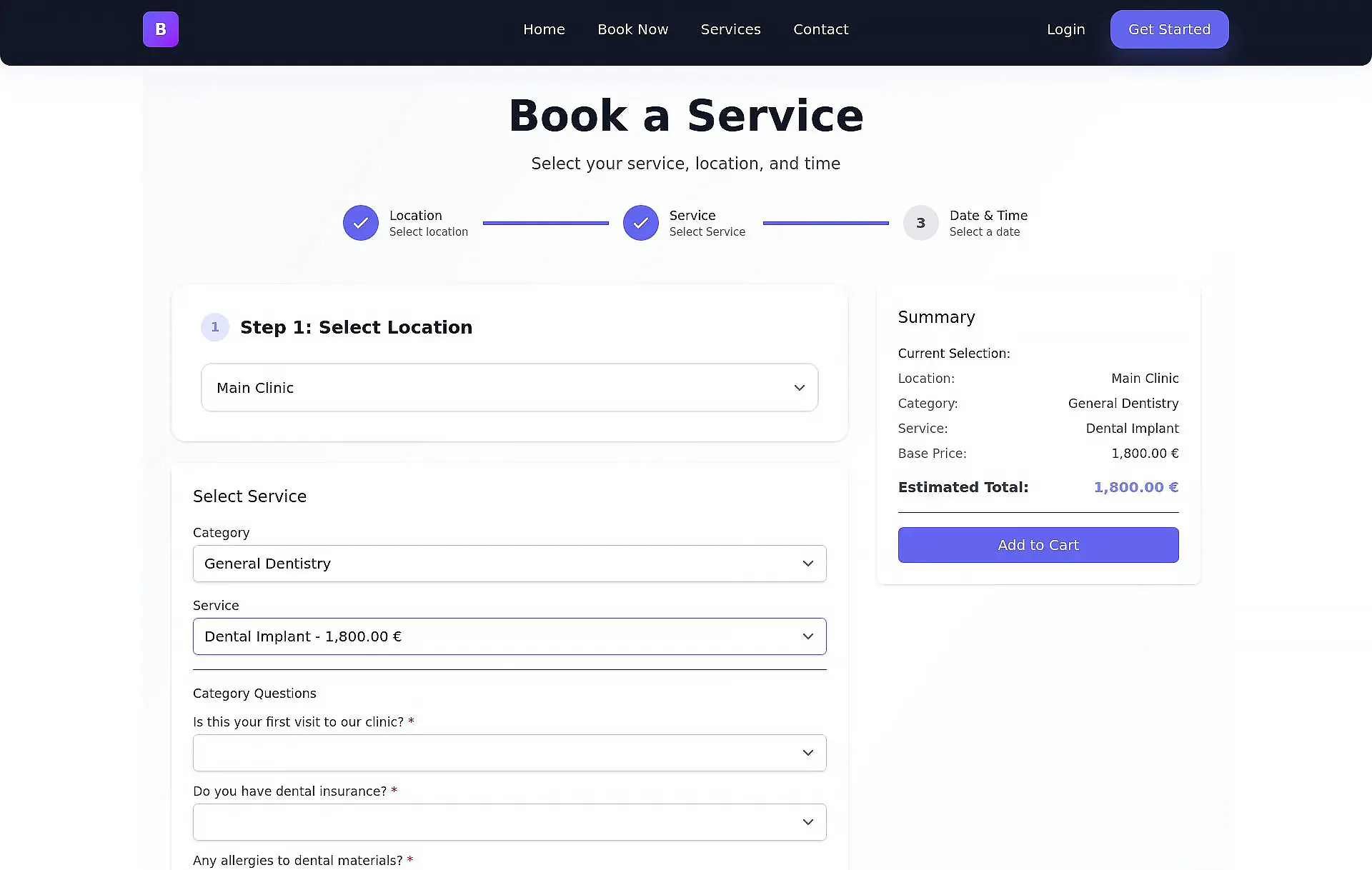
Public booking page with service categories and intake questions
Customer booking flow — services, categories and smart intake questions.
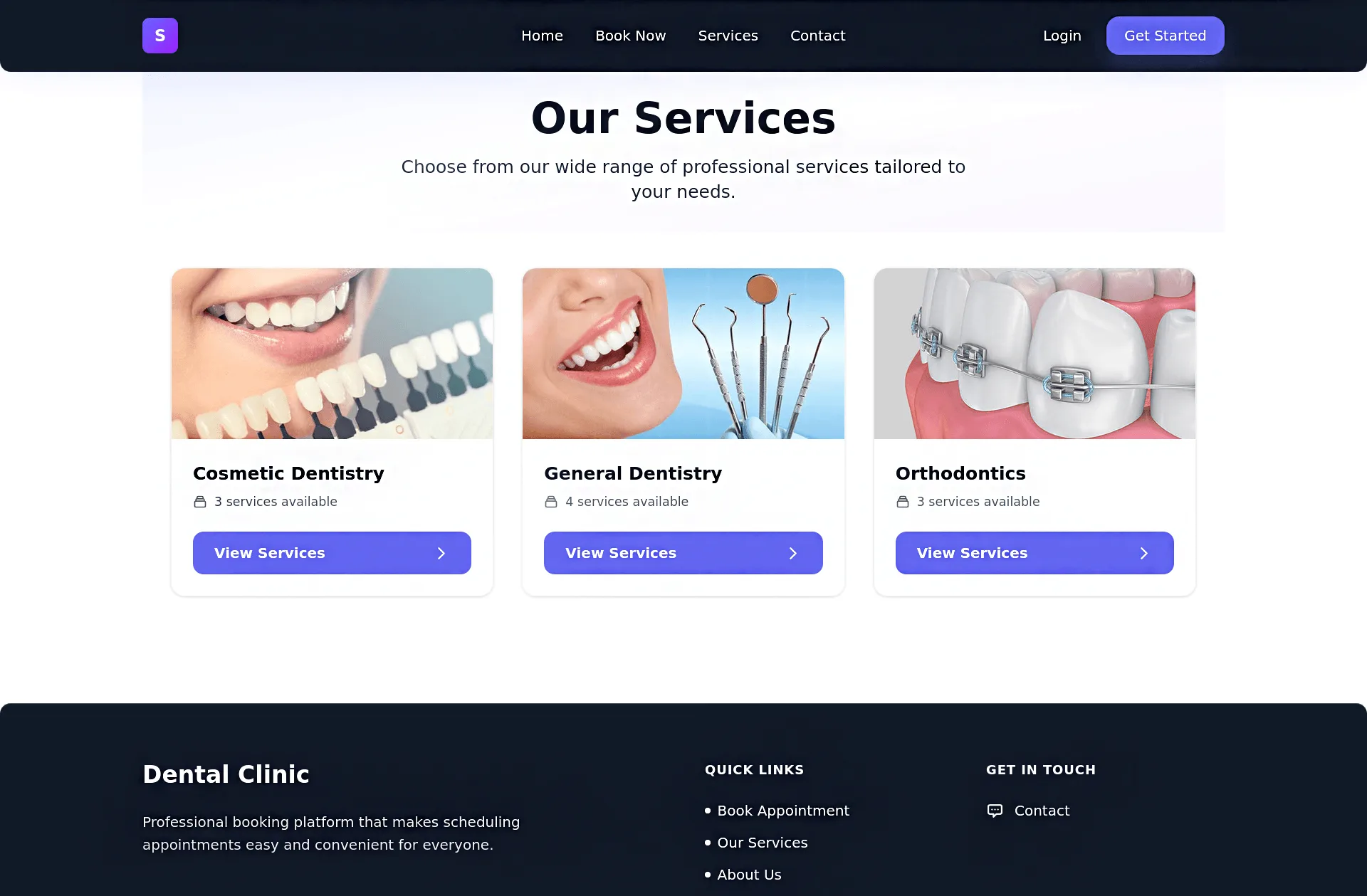
Public services page listing service categories
A clean service catalogue your customers can browse any time.

Ready to see it in action?

Start your 14-day free trial — no credit card required.

Get Started for Free