How to Create a Booking or Quote Form with AI
Describe your service in plain language and let AI build a complete booking or quote form — with sections, questions, dynamic pricing, and conditional logic. No coding, no technical skills required.
Every service business needs to ask the right questions before a booking. A hairdresser needs to know the style and length. A car mechanic needs to know the symptoms. A physiotherapist needs to know the injury and history. A cleaning service needs to know the number of rooms and type of clean.
Building these forms manually takes time — and getting the logic, pricing, and conditions right is tedious. AI form generation solves this. You describe what you need in plain language and the AI builds a complete, structured form with sections, questions, options, pricing and conditional logic. In minutes, not hours.
What is an AI-generated booking or quote form?
An AI-generated form is a structured intake form created automatically by artificial intelligence based on a simple text description. Instead of dragging and dropping fields in a form builder, you type what you need and the AI builds it.
Booking form
Collects information during the booking flow. The customer fills it out before confirming their appointment. Used for intake questions, preferences, consent, or special requirements.
Example prompt:
"A haircut form with style selection, length preference, and consultation notes."
Quote form
Generates a price estimate based on the customer's selections. Each option can add or adjust the price — making it ideal for services with variable costs like auto repair, cleaning, or home renovation.
Example prompt:
"A car repair diagnostic form with symptoms, issue type, and urgency level — each option should adjust the quote price."
Key capability: dynamic pricing
The AI can create forms where the price changes based on what the customer selects — a "deep clean" add-on adds $50, an "engine diagnostic" adds $120, choosing "long hair" increases the price. This is what makes AI forms so powerful for complex services.
Why use AI to create your forms?
10x faster than manual
What takes 30–60 minutes with drag-and-drop builders takes 60 seconds with AI. Type, click generate, review, save.
Industry-aware results
The AI understands every business domain. A physiotherapy intake form automatically includes relevant medical sections; a boat mechanic form gets diagnostic categories.
Built-in pricing logic
Option values can adjust the price (add, set, multiply, subtract). The AI configures this automatically — you do not need to manually wire price rules.
Conditional logic included
Questions appear or hide based on previous answers. The AI sets this up — no manual "if-then" configuration needed.
How AI form generation works behind the scenes
Understanding the process helps you write better prompts and get the most out of the system. Here is what happens when you click "Generate With AI":
Domain classification
The system reads your description and identifies your business type — auto repair, beauty salon, dental clinic, etc. It uses keyword matching and AI classification to determine the domain, which shapes the form's structure and categories.
Form structure planning (BookingSpec Agent)
A "BookingSpec Agent" analyses your text for hints about complexity and form type. A "quick check" request produces a simple form; a "full diagnostic" request produces a detailed one. It plans exactly how many fields each section should have.
AI generation (main LLM call)
The structured plan is sent to a powerful AI model (ChatGPT or Gemini), which generates a complete schema — a structured JSON with sections, fields, options, pricing rules, and conditional logic.
Off-topic check & retry
The system checks if the generated form matches your business type. If the AI generated a hairdresser form for a car mechanic request, it automatically discards the result and retries with a corrected prompt.
Field count validation
The system verifies the form has enough fields to be useful. If the generated form is too sparse, it triggers another retry asking the AI to add more detail. You receive a form that is complete and ready to use.
All of this happens in 1-2 minutes
From clicking "Generate" to seeing your complete form in the visual editor — typically 45-60 seconds. The system handles all the complexity so you do not have to.
Types of forms the AI can create
The AI is flexible. You can generate different form types depending on your business needs:
Quote forms with dynamic pricing
Perfect for auto repair, home services, cleaning, plumbing, electrical, and any service where the price depends on what the customer needs. Each option (e.g. "full engine diagnostic") can add or set a price. The customer sees a live quote during booking.
Medical / health intake forms
For clinics, dental practices, physiotherapy, veterinary, dermatology — collect medical history, allergies, current symptoms, medications. The AI structures these into clinical sections automatically.
Beauty & wellness preference forms
For salons, spas, nail studios, barbershops — collect service preferences (hair length, style, colour), allergies to products, consultation notes. Fast and frictionless for walk-in bookings.
Diagnostic / assessment forms
For mechanics, IT support, pest control, appliance repair — collect problem description, symptoms, severity, urgency. The AI creates logical categories and options for each diagnostic area.
Visibility-only forms (no pricing)
Simple information-collection forms without price changes. Good for screening questions, consent forms, or gathering preferences before a free consultation. The AI still adds conditional logic (show/hide questions) even without pricing.
The AI understands your intent
If you write "I need a form for car repair quotes where customers describe the issue", the AI produces a quote form with diagnostic categories and pricing. If you write "intake form for a new physio patient", it produces a medical intake form. The system reads your context and adapts.
Step-by-step: create your first AI form
Here is how to generate your first AI booking form in Clickobook. The whole process takes about 2 minutes.
Go to Form Templates
In the admin panel, navigate to Form Templates from the sidebar menu. Click "Create Form Templates".
Choose "Generate with AI"
You will see three creation methods: Guided Wizard (step-by-step questions), Generate with AI (direct prompt), and Build Manually (visual editor). Select Generate with AI. Alternatively, choose the Guided Wizard if you prefer answering questions instead of writing a prompt.
Give your form a name
Enter a descriptive name (e.g. "Engine Diagnostic Form" or "New Patient Intake"). This helps you identify it later when attaching to services.
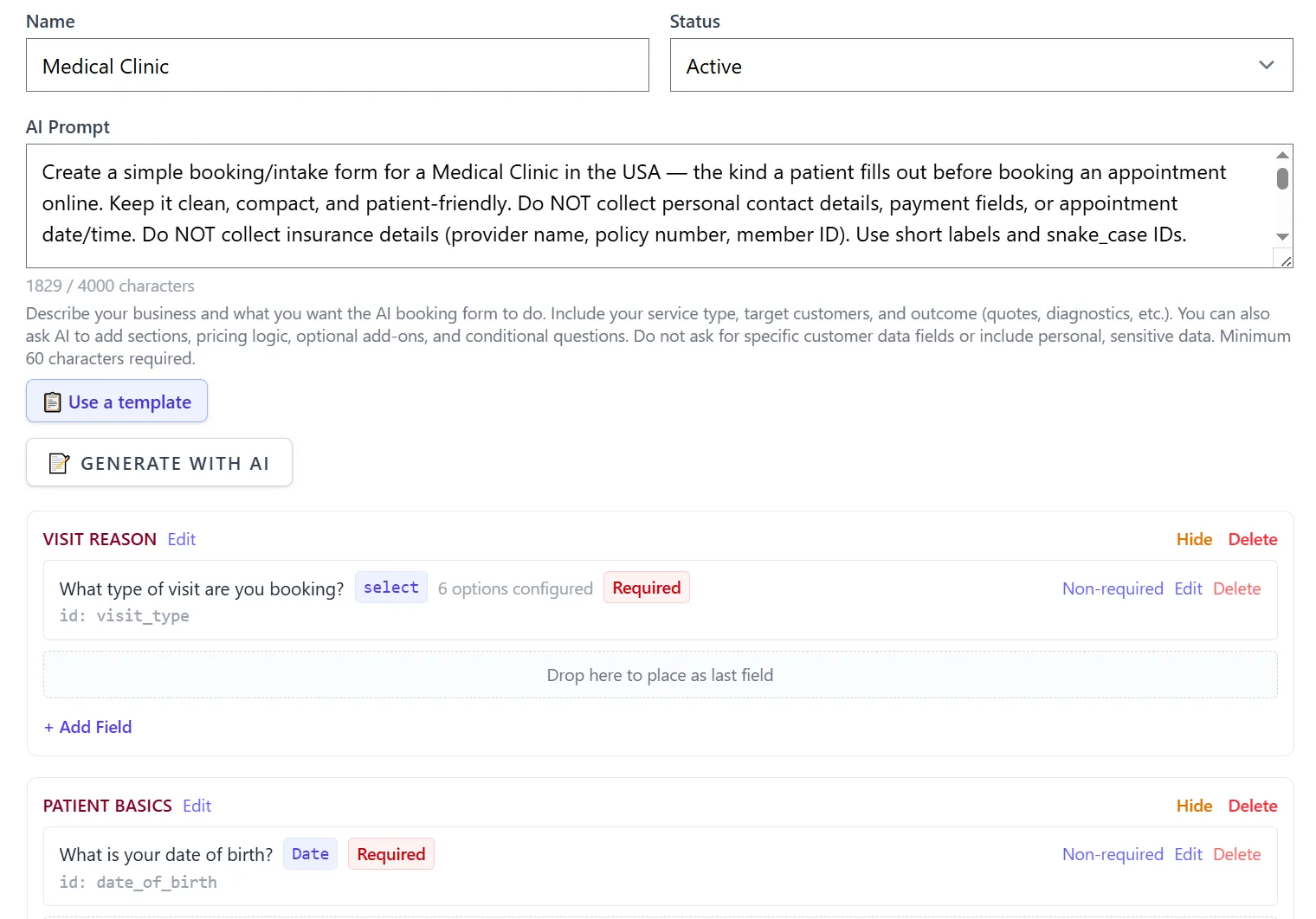
Describe your form in the AI Prompt
Write a clear description of what you need. Include your business type, what information the form should collect, and whether it should calculate prices. Example: "A mobile boat mechanic diagnostic form with engine symptoms, issue location, urgency level, and optional additional services with pricing." Minimum 60 characters required.
Click "Generate With AI"
Click the button and wait 60 seconds. The AI processes your description, runs the generation pipeline (domain classification → form planning → schema generation → validation), and displays the result in the Visual Editor.
Review and edit the form
The generated form appears in the Visual Editor. You can see all sections, fields, and options. You can edit any field — change labels, toggle required/optional, adjust pricing, or modify conditional logic. You can also click "Show schema JSON" to see the raw schema.
Save and attach to a product
Save the form template. Then go to Products (services), edit a service, and assign this form template to it under the "Form Template" section. The form will now appear during the booking flow for that service.
In Clickobook, the entire process takes under 2 minutes
Name your form → describe it → click generate → review → save → attach to a service. That's it. No coding, no schema editing, no complex configuration.
Try it free →Real prompt examples by industry
Here are example prompts for different business types. Each one produces a different form structure tailored to that industry.
🚗 Auto Repair / Mechanic
"Create a compact diagnostic/intake form for an Auto Engine Mechanic in the USA. Do NOT generate personal contact fields, payment fields, or date/time slots. Do NOT include vehicle make/model, service packages, or repair options. Use predefined options, minimal text fields. Keep sections compact and mobile-friendly."
Produces: a diagnostic form with symptom categories, issue types, and urgency levels. Good for mechanics who already capture vehicle info separately.
🏥 Physiotherapy / Rehab
"Create a practical, clinic-grade booking and intake form for a Physiotherapy / Physical Therapy / Rehab clinic. Do NOT collect personal contact or payment fields. The form should collect: injury type and affected body area, pain level and duration, aggravating factors, previous treatments and outcomes, and current activity level."
Produces: a medical intake form with injury assessment, pain scale, medical history, and lifestyle questions. Patients fill this before their first appointment.
🧹 House Cleaning
"Create a simple booking/intake form for a House Cleaning service. The form should collect: type of cleaning (standard, deep, move-in/out), number of bedrooms and bathrooms, total square footage, any special requirements (pet presence, allergy concerns), and preferred cleaning products (eco-friendly, standard, or client provides). Each cleaning type should adjust the final price."
Produces: a quote form where the price changes based on cleaning type, number of rooms, and special requirements. Customers get an instant price estimate.
💇 Hair Salon
"Create a professional, mobile-friendly booking/intake form for a Hair Salon. Do NOT collect personal contact information. The form should focus on: hair length (short, medium, long), desired service (cut, colour, styling, treatment), hair type and texture, allergies or sensitivities, and consultation notes. Use multiple choice options where possible."
Produces: a streamlined preference form that helps stylists prepare before the appointment. Quick to fill, designed for mobile booking.
🦷 Dental Clinic
"Create a simple booking/intake form for a Dental Clinic — the kind a patient fills out before booking. Do NOT collect personal contact or payment fields. The form should include: reason for visit (check-up, cleaning, filling, emergency), pain level and location, any dental anxiety, previous dentist, last visit date, and medical conditions relevant to dental treatment."
Produces: a pre-appointment screening form that helps the clinic prepare. Covers reason for visit, medical history, and patient preferences.
🐾 Pet Grooming
"Create a professional booking/intake form for a Pet Grooming service. Do NOT collect personal contact information. The form should cover: pet type and breed, size category, coat type, desired grooming service (full groom, bath & brush, nail trim, etc.), any behavioural concerns, and medical conditions or sensitivities."
Produces: a pet-specific intake form with breed, size, and service selection options. Helps groomers prepare for each pet's needs.
🔌 IT Support / Computer Repair
"Create a practical booking/intake form for IT Support / Computer Repair services. The form should collect: device type (desktop, laptop, server, network), operating system, issue category (hardware, software, network, security), problem description, urgency level, and any steps already taken. Include pricing options for different diagnostic tiers."
Produces: a technical diagnostic form with device categories, issue types, and priority levels. Pricing adjusts based on diagnostic tier selected.
📋 Quick-start: use a pre-written prompt
Clickobook includes a library of 60+ pre-written prompt templates covering everything from auto repair to veterinary clinics. When creating a form, click "📋 Use a template" next to the AI Prompt field to browse and load a ready-made prompt. Customize the details, then generate.
Tips for writing great AI prompts
The quality of your form depends heavily on how you describe it. Here is how to get the best results:
DO: Mention your business type
"Auto repair shop" → the AI knows to use diagnostic categories. "Dental clinic" → the AI creates medical-style sections. Be specific about your industry.
DON'T: Be vague
"Make a form for my business" gives the AI no direction. You get a generic form. Always specify what kind of business and what information you need.
DO: Mention pricing if needed
"Each cleaning type should adjust the price" → the AI adds set_price/add_price modifiers. Without this hint, you may get a form without pricing.
DON'T: Include customer personal data requests
Do not ask the AI to generate fields for sensitive personal data (IDs, financial details, medical conditions beyond what the service needs). The system has safeguards against this.
DO: Specify form complexity
"Quick check" or "simple" → produces a compact form. "Full diagnostic" or "comprehensive" → produces a detailed form with more sections and fields.
DON'T: Expect perfection on the first try
The AI does a great first pass, but you can always refine. Use the Visual Editor to tweak fields, or use "Refine With AI" for follow-up adjustments.
The formula for a great prompt
[Business type] + [What info to collect] + [Pricing? Conditional logic?] + [Complexity hint]. Example: "A physiotherapy intake form collecting injury type, pain level, and medical history. No pricing needed. Keep it simple with 3–4 sections."
Refining your form with AI
The first generation is rarely the final version. Clickobook lets you refine an existing AI-generated form with a follow-up prompt — no need to start from scratch.
Add more sections
"Add a section for payment preferences and another for appointment notes." The AI adds the new sections to your existing form structure.
Adjust pricing
"Make the 'full detail' option add $150 to the price and the 'basic wash' add $40." The AI updates the price modifiers directly.
Change conditional logic
"Only show the pet behaviour section if the customer selects 'nervous' for temperament." The AI adjusts the show/hide rules.
Simplify or expand
"This is too detailed. Merge the symptom categories into a single text field." Or: "Break the medical history into more specific questions."
Manual editing is also available
You can edit every aspect of the form using the Visual Editor — no AI required. Reorder sections, change field types, add or remove options, toggle required/optional. The schema JSON is also visible for advanced users.
AI form generation — frequently asked questions
Yes. The AI can generate forms where field choices affect the final price — using set_price, add_price, amount, and value modifiers. For example, a car repair form where selecting "oil change" adds $50, or a cleaning form where "deep clean" adds $80. You can also generate visibility-only forms (no pricing) for simple intake or screening.
The AI supports 60+ business domains including auto repair, beauty & spa, dental clinics, physiotherapy, home cleaning, plumbing, electrical, HVAC, pet grooming, tutoring, legal consulting, photography, and many more. The system uses domain classification to adapt the form structure to your industry — a dental intake form looks very different from a boat mechanic diagnostic form.
Yes. After AI generation, you can modify every section, field, and option using the Visual Editor — add or remove fields, change labels, set required/optional, configure pricing, and add conditional logic. You can also refine the form with a follow-up AI prompt using "Refine With AI".
The system has built-in safeguards: an off-topic detection check catches forms that stray from your business description and triggers an automatic retry. A field-count validation ensures the form has enough fields to be useful. If the result still needs adjustments, you can refine it with AI or edit manually.
No. You describe your business and what you need in plain language — the AI handles everything. If you want a "dermatology consultation form with allergy info and current medication" you just type that. The AI builds the complete form with sections, questions, options, and pricing logic. No coding, no schemas, no technical knowledge required.
Yes. The number of AI prompts you can use per month depends on your plan. Each generation or refinement counts as one prompt. The current usage is displayed in the Form Templates page. Manual form creation (without AI) is unlimited across all plans.
No. AI form generation is included in every Clickobook plan, including the free plan — there is nothing to unlock and no per-use or per-form fee. Each plan simply comes with a monthly AI prompt allowance (the free plan includes one too), and higher plans include more generations and refinements per month.
Ready to create your first AI form?
Clickobook includes AI form generation in eligible plans — describe your service and let AI build the complete form. Start your free trial today.