How to Collect Deposits for Appointments (Partial Payment Guide)
Reduce no-shows, improve cash flow and offer flexible payment options — all by collecting deposits at checkout. This guide covers everything from choosing the right deposit type to configuring full-payment discounts.
If you run a service business — a salon, clinic, training studio or trade service — you have felt the pain of no-shows. An empty slot costs you not just the revenue, but the time and opportunity you could have filled with another client.
Deposits fix this. By asking clients to pay a fraction of the price when they book, you turn a free reservation into a financial commitment. No-shows drop dramatically — and your cash flow improves because you collect revenue earlier.
Why collect deposits?
Fewer no-shows
A deposit of 25–50% reduces no-shows by up to 80% compared to free booking. Clients think twice before missing a paid slot.
Better cash flow
Collecting deposits means you get paid earlier — sometimes weeks before the service date. That improves your working capital.
Committed clients
Clients who put money down show up. They also treat the appointment as more valuable — and are more likely to return.
Flexible payment options
Offer clients a choice: pay a deposit and settle the balance later, or pay in full and get a discount. Different clients prefer different options.
Types of deposits
There are two main ways to structure a deposit, and the best choice depends on your business model.
Percentage deposit
Example: 30% of total
A percentage of the total booking price. Scales automatically with add-ons, options and dynamic pricing.
- Automatic — no manual amounts per service
- Works with any service price
- Best for services with varying prices
Fixed deposit
Example: $20 per booking
A fixed amount charged per appointment regardless of the total price. Simple and predictable for clients.
- Easy to communicate to clients
- Predictable revenue per booking
- Best for fixed-price services
Both types in Clickobook
Clickobook supports both percentage (up to 99%) and fixed deposits. You can also configure which payment methods accept deposits — Stripe, PayPal, or cash at the venue.
Full-payment discount: the deposit companion
A full-payment discount is an incentive you offer when a client chooses to pay 100% upfront instead of leaving a deposit with a balance. It is calculated before tax and can be a percentage or a fixed amount.
How it works in practice
| Pay deposit (30%) | Pay in full (10% off) | |
|---|---|---|
| Service price | $100 | $100 |
| Discount (pre-tax) | — | −$10 |
| Deposit due now | $30 | $90 |
| Balance due later | $70 | — |
The client chooses: leave a deposit now and pay the rest later, or get a discount by paying everything upfront. This flexibility improves both conversion and cash flow.
Clickobook supports both simultaneously
When you enable deposits, you can also configure a full-payment discount — percentage or fixed, calculated pre-tax. The checkout shows both options and the client picks one.
How to offer a full-payment discount with deposits →When should you collect a deposit?
Not every booking needs a deposit. Here is when deposits make the biggest impact:
High-value services
Dental procedures, tattoo sessions, intensive treatments, packages — anything over $100 benefits from a deposit.
Long appointments
Services lasting 2+ hours where a no-show wastes significant staff time and opportunity.
New clients
First-time bookers have no history. A deposit ensures commitment before you reserve a slot.
Peak hours & weekends
Saturday appointments and after-work slots are in high demand. A deposit protects that premium time.
When NOT to require a deposit
Low-value quick services (e.g. $15 haircuts), ultra-competitive markets where deposit requirements could push clients to a competitor, and recurring/club members where the membership itself secures commitment.
Deposit setup checklist
Here is how to configure deposits in your booking system step by step:
Choose your deposit type
Decide between percentage (e.g. 30%) or fixed amount (e.g. $20). Most service businesses start with 25–30%.
Set your full-payment discount (optional)
Offer 5–10% off when clients pay in full. This encourages upfront payment and reduces your balance-tracking workload.
Choose payment methods
Decide which payment methods can accept deposits — Stripe or PayPal. Most businesses enable all.
Set balance due days
Configure when the remaining balance is due (e.g. on the day of the appointment). Clickobook lets you set a custom balance-due window.
Set your refund policy
Define your refund and cancellation policy in your Terms page — make it clear whether deposits are refundable or non-refundable. Refunds are processed manually from the admin panel (Admin → Transactions) for both Stripe and PayPal payments.
Test the checkout flow
Make a test booking with a deposit to verify the checkout flow shows the right amounts and the confirmation email reflects the deposit.
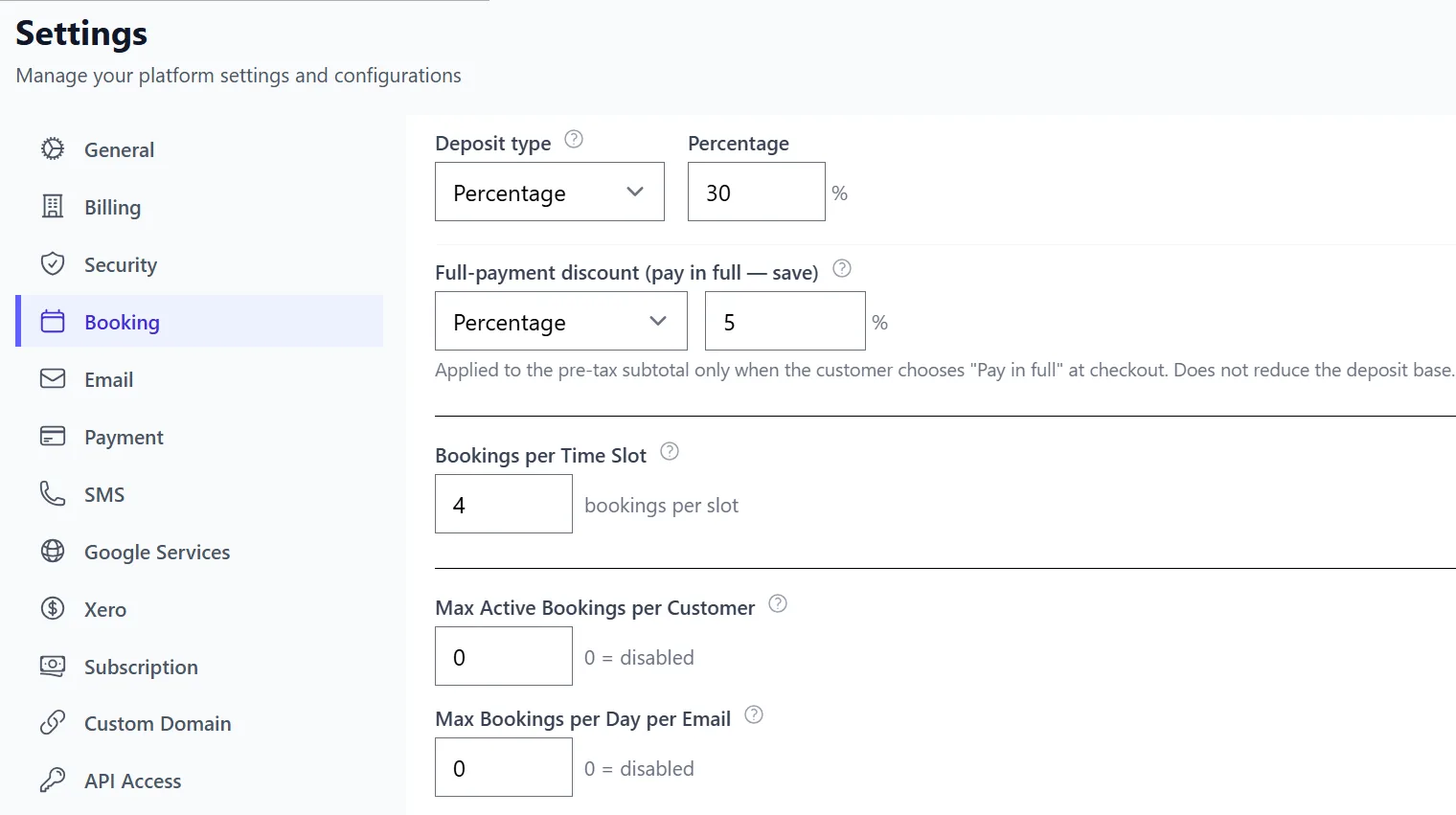
In Clickobook, this takes 2 minutes
Go to Admin → Settings → Bookings → Enable deposit payments and configure your deposit percentage, full-payment discount and payment methods. Everything is in one place — no plugins, no add-ons.
Try it free →Common deposit mistakes to avoid
Deposit too low (<10%)
A tiny deposit does not change client behaviour. It feels like "free booking with a small fee" and does not reduce no-shows meaningfully. Keep it at 25% or above.
Deposit too high (>75%)
Above 75% it starts to feel like full payment, which can scare off new clients who are not sure about your service. Reserve high deposits only for custom/premium bookings.
No deposit policy displayed
Clients should see the deposit amount and refund policy clearly before they pay. Surprise deductions at cancellation create negative reviews. Show it on the booking page.
No balance tracking
If you collect deposits manually or your system does not track balances, you lose money on unpaid balances. Use a system that calculates and tracks the remaining due automatically.
Ignoring full-payment discount
A full-payment discount is a win-win: clients save money and you get paid upfront. Not offering it is a missed opportunity to improve cash flow and client satisfaction.
Getting it right
The sweet spot for most service businesses is 25–50% deposit with a 5–10% full-payment discount. This balances commitment for the client, cash flow for you, and flexibility for both sides.
Deposit & partial payment — frequently asked questions
Most service businesses charge between 25% and 50% of the total price. For high-value procedures (dental work, tattoo consultations, intensive treatments) 50% is common. For regular appointments (haircuts, massages) 25% is usually enough to deter no-shows without scaring clients away. You can also charge a fixed amount (e.g. $20 per appointment) instead of a percentage.
Yes. You can process partial or full refunds from the admin panel (Admin → Transactions) for both Stripe and PayPal payments. Your refund policy — whether deposits are refundable or non-refundable on cancellation — is defined in your Terms page and communicated to clients at checkout.
A deposit is a partial payment collected at checkout (e.g. 30%) — the rest is paid later at the venue or via a payment link. A full-payment discount is an incentive (e.g. 10% off) when the client chooses to pay 100% upfront instead of leaving a balance. These two work together: you offer the discount for paying in full, and default to a deposit otherwise. Clickobook supports both simultaneously.
Yes. If a client adds a service on the day or incurs extras (product upsells, additional time), you can add surcharges to the booking from the admin panel. These are tracked separately from the original deposit or payment and appear in the balance due.
No. Clickobook takes 0% commission on any payment collected through the platform — including deposits, full payments and balance payments. You only pay your own Stripe or PayPal processor fees (typically 2.9% + $0.30).
Ready to start collecting deposits?
Clickobook includes deposits, full-payment discounts and balance tracking out of the box — no add-ons, no extra cost. Start your free trial today.