How to Offer a Full-Payment Discount with Deposits
Encourage customers to pay 100% upfront by offering a discount — while still giving them the option to leave a deposit. This guide explains how the incentive works, how it is calculated, and how to configure it in Clickobook.
You already know that deposits protect you from no-shows — a customer who puts money down shows up. But there is a second, quieter lever next to deposits that many businesses forget: reward the customers who skip the deposit entirely and pay in full.
A full-payment discount is a discount offered at checkout when a customer chooses to pay 100% of the price upfront instead of paying a deposit and settling the balance later. It is a win-win: the customer saves money, and you get paid in full immediately — with zero balance to chase afterwards.
What is a full-payment discount?
A full-payment discount is an optional incentive configured alongside deposits. When deposits are enabled, the checkout lets customers pick between two payment options:
Pay deposit only
The customer pays a percentage or fixed deposit now (e.g. $30) and the remaining balance later — at the venue or via a payment link.
Pay in full — save
The customer pays the entire amount now and receives a discount (e.g. 5% off). The checkout displays the reduced total with a "save $X" badge.
In Clickobook it is a dropdown next to deposits
The full-payment discount lives inside the Deposit Payments settings. You pick a type — percentage or fixed — and a value. The checkout does the rest.
Why offer a pay-in-full discount?
Adding a full-payment discount alongside deposits changes customer behaviour in four measurable ways:
Immediate cash flow
Full payments land in your account at checkout — sometimes weeks before the service date. No balance to remind, chase or collect later.
Zero balance tracking
Every "pay in full" booking has a zero balance by default. Your admin workload drops — no payment links, no reminders about the rest of the money.
Fewer no-shows
A customer who paid in full has the strongest possible incentive to show up. Full payment is the ultimate financial commitment.
Higher average revenue
Customers who choose "pay in full" almost always spend more — they have already committed, so add-ons and upgrades feel easier to accept.
The discount pays for itself
A 5% discount on a $100 booking costs you $5 — far less than the $100 you lose (or the hour of staff time you waste) on a single no-show. The maths is heavily in your favour.
How it works at checkout
When deposits are enabled and a full-payment discount is configured, the checkout shows the customer a clear choice with the numbers visible up front:
What the customer sees (radio buttons):
Pay in full
$100 $95 save $5
Pay the entire amount now
Pay deposit only ($30)
Full amount: $100
Pay a deposit now, the remaining balance later
The reduced price is shown with the original struck through and a bright "save $X" badge, so the incentive is impossible to miss. The customer keeps full control — the deposit option remains available for those who prefer to pay in two steps.
One-time bookings only
The payment option choice is shown only for one-time bookings with online payment. Recurring subscription bookings always pay in full and never receive the deposit or full-payment discount. At-venue payment also skips the choice.
The maths: pre-tax discount, recalculated tax
The full-payment discount is applied before tax, exactly like a coupon. Tax is then recalculated on the reduced amount. This keeps your invoices consistent with your tax reporting. Here is a complete example with a 21% tax rate and a 5% percentage discount:
| Pay deposit (30%) | Pay in full (5% off) | |
|---|---|---|
| Service price | $100 | $100 |
| Pre-tax subtotal | $82.64 | $82.64 |
| Discount (5% pre-tax) | — | −$4.13 |
| Tax (21% recalculated) | $17.36 | $16.49 |
| Total charged at checkout | $30.00 (deposit) | $95.00 |
| Balance due later | $70.00 | — |
Percentage discount
A percentage of the pre-tax subtotal (e.g. 5%). Capped at 50% as a safety limit.
Fixed discount
A fixed amount off (e.g. $10). Capped at 50% of the pre-tax subtotal as a safety limit.
Deposit base untouched
The discount never reduces the deposit amount — the deposit option is always based on the original total.
Why the deposit base is never reduced
If the discount also reduced the deposit, the "pay in full" option would lose its advantage — a customer could pay a smaller deposit AND still get the discount. By keeping the deposit at the original price, paying in full (e.g. $95) is always strictly better than deposit + balance (e.g. $30 + $70 = $100).
Combining with coupon codes
Coupons and the full-payment discount work together in a defined order: the coupon is applied first, reducing the pre-tax subtotal, and the full-payment discount is then calculated on the post-coupon amount.
| Order of operations | Example ($100 service) |
|---|---|
| Original price | $100 |
| Coupon (10% off, applied first) | −$10 → $90 |
| Full-payment discount (5% on post-coupon subtotal) | −$4.50 → $85.50 |
| Total paid (pay in full) | $85.50 |
You control whether they stack
Stacking is allowed by default. If you prefer not to combine coupons with the pay-in-full discount, simply disable one of the two — there is no forced exclusion logic. Both are optional features under your control.
When should you offer a pay-in-full discount?
The discount is not right for every business. Here is when it earns its keep:
High-value services
Dental work, tattoo sessions, intensive treatments, large home-service jobs. Paying the full $200–$500 upfront is a real sacrifice — the discount makes it easier to say yes.
Frequent no-show problems
If your calendar bleeds revenue to no-shows, steer customers toward full payment. Combined with deposits, you protect every slot twice over.
Seasonal or campaign pushes
Turn it on for peak season (December, summer) to secure cash before the busiest period starts. A temporary incentive drives urgency.
Businesses that hate chasing balances
If you dislike reminding customers about outstanding balances, the discount quietly moves more bookings to "paid in full, done".
When NOT to use it
Very low-priced services where 5% is a rounding error, ultra-competitive markets where you cannot afford any discount, and businesses whose clients strongly prefer splitting the payment. The deposit option stays available — but if most clients still pick the deposit, the discount is doing little for you.
How to set it up in Clickobook
The full-payment discount is part of the Deposit Payments settings — it cannot exist without deposits. Here is the complete setup:
Enable deposit payments
Go to Admin → Settings → Bookings → Deposit Payments and enable deposits. The full-payment discount only works while deposits are on — if deposits are disabled, the discount stays stored but becomes inactive.
Configure your deposit
Choose a deposit type — percentage (1–99%) or fixed amount (minimum $1.00) — and set the value. Most businesses start with 25–30%.
Set the full-payment discount
In the "Full-payment discount (pay in full — save)" field, choose Percentage or Fixed and enter the value. 5–10% is the sweet spot for most businesses.
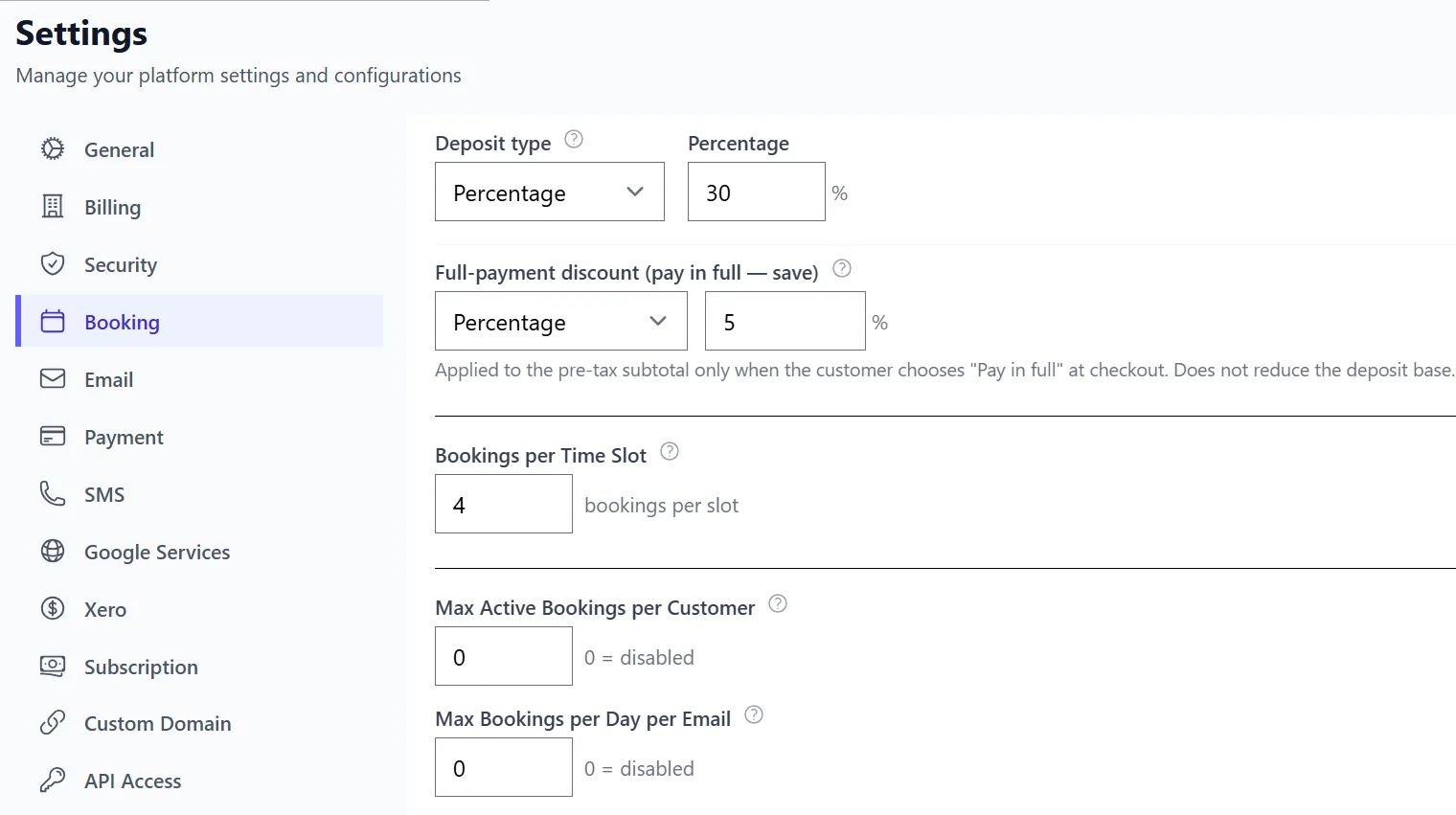
Choose payment methods
Select which payment methods can accept payments — Stripe, PayPal, or cash at the venue. The pay-in-full option appears for online payment methods.
Save and test the checkout
Make a test booking with a deposit and one with "pay in full". Verify the reduced total shows correctly, tax is recalculated, and the confirmation email reflects the correct amount.
In Clickobook, this takes one minute
Both the discount and the deposit are configured in the same settings section. The checkout, invoice and booking breakdown handle the rest automatically — no plugins, no add-ons, no extra fees.
Try it free →Common mistakes to avoid
Discount too generous (>15%)
A large discount eats your margin and trains customers to wait for discounts. 5–10% is enough to move behaviour without hurting profitability. The platform caps discounts at 50% as a safety net — stay well below it.
Forgetting the deposit side
The full-payment discount is only active while deposits are enabled. If a staff member switches deposits off, the discount silently goes inactive too. Check both settings together.
Offering it on subscriptions
Subscription bookings always pay in full and never receive the discount. Do not promise "pay in full discounts" to members — it will not apply to their recurring plans.
Setting a fixed discount larger than the service
The fixed discount is capped at 50% of the pre-tax subtotal, so the system protects you. Still, review your average ticket size and keep the fixed amount reasonable relative to it.
Not communicating the incentive
The checkout shows the "save $X" badge automatically, but repeat customers who book at the venue or by phone never see it. Mention the pay-in-full discount in your booking confirmation and follow-up emails.
Getting it right
The sweet spot for most service businesses is a 25–30% deposit with a 5–10% full-payment discount. Customers who value convenience pay in full and save; customers who prefer flexibility leave a deposit. Both are protected against no-shows, and you get paid either way.
Full-payment discount — frequently asked questions
Most service businesses offer between 5% and 10% off for paying in full. At that level the discount is attractive enough to change checkout behaviour without eating meaningfully into your margin. You can also set a fixed amount (e.g. $10 off) instead of a percentage — the choice depends on your average ticket size.
Yes. The coupon is applied first, reducing the pre-tax subtotal, and the full-payment discount is then calculated on the post-coupon amount. Both can stack. If you prefer not to combine them, simply disable one of the two — the system does not force stacking.
Before tax. The discount is calculated on the pre-tax subtotal, and tax is then recalculated on the reduced amount. This is standard accounting practice and keeps your tax reporting consistent.
No. The full-payment discount never reduces the deposit base. The deposit option is always calculated on the original total (e.g. 30% of $100 = $30), while paying in full earns the discount (e.g. $95). This keeps the "pay in full" option strictly more attractive than "deposit + balance".
Yes, for safety. Both percentage and fixed discounts are capped at 50% of the pre-tax subtotal. This prevents accidental misconfiguration from giving services away.
No. Clickobook takes 0% commission on any payment collected through the platform — including full payments, deposits and balances. You only pay your own Stripe or PayPal processor fees (typically 2.9% + $0.30).
No. Recurring subscription bookings always pay in full and never receive the deposit or full-payment discount. The payment option choice (deposit vs pay in full) is only shown for one-time bookings.
Related resources
How to Collect Deposits for Appointments
The full-payment discount works hand-in-hand with deposit types and balance tracking.
How to Reduce No-Shows — Complete Strategy Guide
Pay-in-full incentives are Tier 1 of a complete no-show prevention strategy.
All guides
Browse more how-to articles for service businesses
Pricing
Flat per-business pricing, 0% commission — deposits and discounts included.
Get paid in full, more often
Clickobook includes deposits, full-payment discounts and balance tracking out of the box — no add-ons, no extra cost. Start your free trial today.