How Recurring Subscriptions Auto-Reschedule — and Never Lose Value
Recurring subscriptions generate your customer's next booking on the same staff automatically — and when a slot is gone, the system reschedules to a nearby time or issues a credit, so the money your customer already paid is never lost. This guide explains exactly how it works, for unlimited and limited-cycle plans.
Recurring subscriptions are how you turn one-time clients into regulars — a personal trainer booked for six months, a salon client with a standing monthly appointment, a dental practice with a check-up plan. You get predictable, recurring revenue, and the customer gets a set-and-forget routine.
The problem with most tools is that they book the first appointment and stop. When the next cycle comes around, either nothing happens (the customer slips through the cracks) or the system silently fails when their slot is taken. Clickobook takes a different approach: it keeps generating the next booking automatically, and when a slot isn't available it rebooks to a nearby time or issues a credit — so the value your customer paid for is never lost.
Why recurring subscriptions?
Predictable revenue
Subscription plans bill automatically on a rolling schedule (daily, weekly, monthly and more), so you can forecast income and fill your calendar weeks ahead.
Set-and-forget clients
Your customer picks an interval once, pays, and the next session is booked for them automatically. No chasing "shall we book again?" every month.
Value never lost
If a slot is unavailable, Clickobook moves the session to a nearby time or credits the customer — it never just takes the money and leaves them without an appointment.
Keeps the same staff & service
Every generated cycle reuses the staff member, service, location and preferences of the first (anchor) booking — so the consistent experience your customer signed up for continues.
How recurring subscription auto-scheduling works
When a customer buys a recurring plan, the first booking becomes the subscription anchor — the "source" booking that stores the plan, service, staff, and the preferred day and time. From there, the platform takes over and generates the next booking each cycle.
The flow, cycle by cycle:
Customer buys the plan at checkout
They pick a renewal interval (e.g. monthly), pay, and receive the first booking plus a confirmation email describing the recurring schedule.
The scheduler prepares the next cycle
A background scheduler (running continuously at the platform level) pre-generates the next upcoming booking on the same staff and service, following the customer's preferred day and time.
The system finds the best available slot
It first tries the exact preferred day and time. If that's taken, it searches nearby dates (up to a few days earlier or later) for the nearest open slot, preferring the closest time before the preferred one.
Every cycle is booked financially, not stuck
Each generated booking keeps the exact price and breakdown of the plan. If it lands on a different time, you and the customer get an automatic reschedule email (and an SMS that arrives at a humane hour).
The three outcomes: booked, rescheduled, or credited
For every subscription cycle, exactly one of three things happens. All three keep the value your customer paid for — none of them leaves a paid customer without an appointment or a usable credit.
Booked as preferred
The exact preferred day and time are open, so the next booking is created there — same staff, same service, same slot. Nothing to do; the customer just confirms the reminder and shows up.
Auto-rescheduled
The preferred slot is taken, so the system rebooks to the nearest available time — up to a few days before or after, on the same staff. You and the customer are both notified so nobody is surprised.
Credited
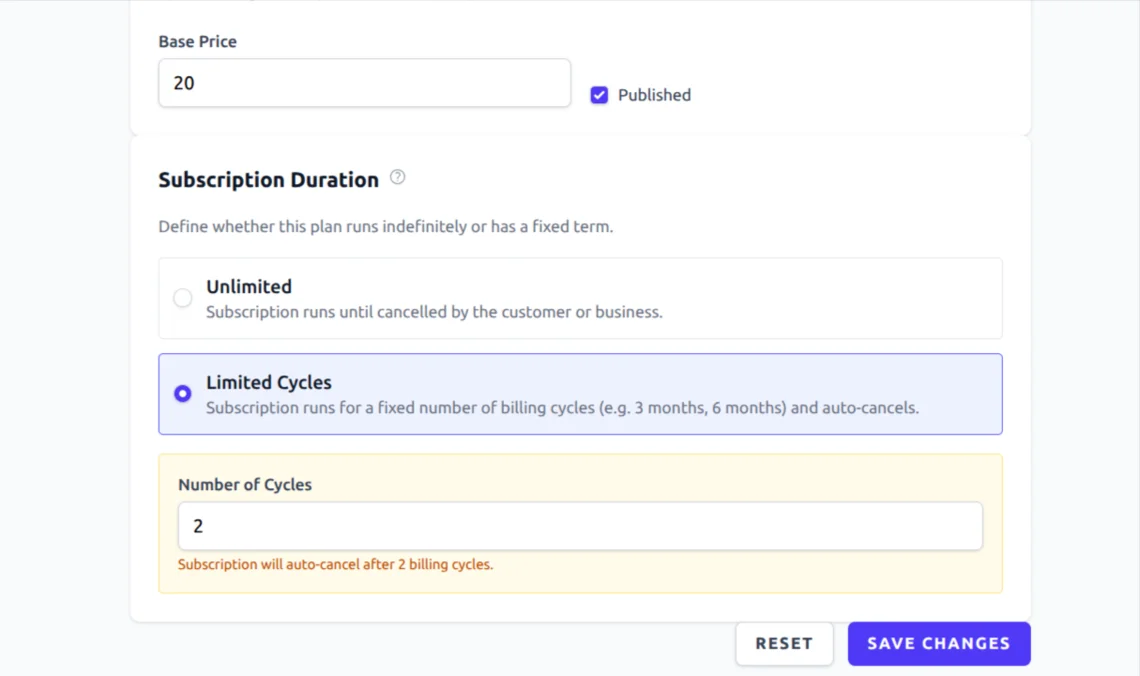
No slot exists anywhere nearby. Instead of charging for nothing, the system adds a subscription credit to the customer's account — automatically applied to the next one-time booking they make, and it never expires.
Notified either way
When a booking moves, the customer and staff get an automatic reschedule notification. When a credit is issued, the customer gets a "credit added to your account" email and SMS. No silent surprises.
Why credits matter
Recurring plans often bill in advance, so a missing slot should never mean "you paid and got nothing". The credit fallback keeps the customer's paid value intact — and because credits survive even if the subscription is stopped, it's a safety net that stays with the customer for good.
Unlimited vs limited-cycle subscriptions
When you create a plan, you choose how long a subscription runs. Both options use the same auto-scheduling, reschedule and credit engine — the only difference is whether there's a planned end.
Unlimited
The subscription runs indefinitely on the chosen interval. It only ends when the customer stops it (from their portal) or you cancel it (from the admin panel). Best for long-term memberships and standing appointments.
Limited Cycles
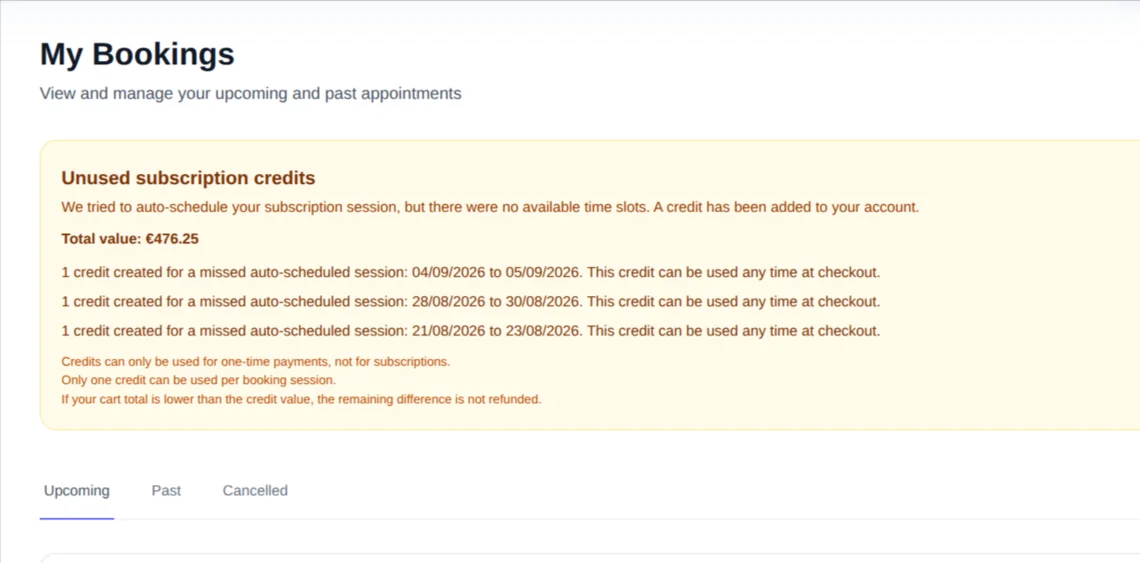
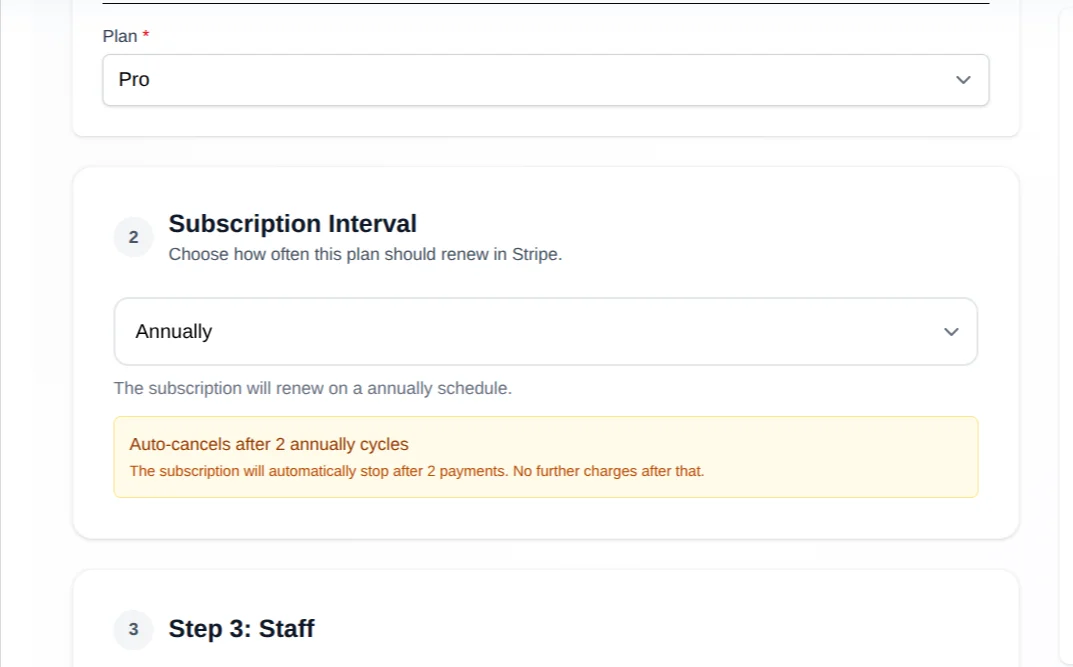
You set a fixed number of billing cycles (e.g. 6 for a 6-month plan). The subscription auto-cancels after the last cycle — at the provider and in the system — so there are no further charges or bookings. Customers see a "Cycle X of Y" progress indicator.
Long-term plans
Use Unlimited for coaching packages, salon standing appointments, and memberships where clients stay for months or years.
Short-term programs
Use Limited Cycles for treatment programs (e.g. 6 months of dental check-ups), training blocks, or any plan with a known end date.
Both work the same
Auto-reschedule and credit fallback behave identically in both — the value is protected whether the plan runs forever or ends after a set number of cycles.
How to set up recurring subscriptions in Clickobook
The subscription engine runs automatically once you create a plan — you don't need any extra configuration for rescheduling or credits. Here is the setup:
Create a recurring plan
Go to Admin → Plans → Create Plan and set a title and price. This is the plan customers buy to get recurring bookings.
Choose the duration
In Subscription Duration, pick Unlimited or Limited Cycles. For a fixed-length program, choose Limited Cycles and enter the number of billing cycles (between 1 and 60).
Allow the intervals you want
In your booking settings, enable the renewal intervals customers can choose at checkout — daily, weekly, every 2 weeks, monthly, every 6 months and annually.
Connect a payment method
Recurring subscriptions bill through Stripe or PayPal. Make sure at least one is connected, so the plan can charge on each cycle.
Test with a real booking
Buy the plan as a test customer and check that the next cycle is generated. Then block the preferred slot and confirm the booking auto-reschedules (or issues a credit) and that the customer is notified.
No extra setup for auto-reschedule
Rescheduling, credit fallback and the same-staff preference are built into the subscription engine. You just create the plan — the platform handles the rest automatically, with no add-ons or separate configuration.
Try it free →Common mistakes to avoid
Forgetting to allow the interval
If the renewal interval a customer needs isn't enabled in your booking settings, they can't choose it at checkout. Enable every interval you plan to offer before publishing the plan.
Using Limited Cycles for open-ended plans
If a client should stay subscribed until they cancel, don't set a cycle limit — an Unlimited plan stops only when the customer or you stop it. A limited-cycle plan auto-cancels at its end, which would surprise long-term members.
No payment method connected
Recurring plans need a connected Stripe or PayPal account to charge each cycle. Without one, subscriptions can't renew automatically — check that a payment method is active before launching the plan.
Ignoring reschedule notifications
When a session moves to a nearby slot, both you and the customer are notified. Confirm you recognise the notifications (and the customer's) — a missed reschedule could mean a guest expecting a different time.
The one-line health check
Create a test subscription, then check the customer portal: the next cycle should already be booked (or credited), "Cycle X of Y" should reflect the plan's limited cycles when set, and no customer should ever be charged for a cycle that silently produced nothing.
Recurring subscriptions — frequently asked questions
When a subscription cycle is due, Clickobook first looks for the exact same day and time as the anchor booking. If that slot is taken, it searches nearby dates — up to a few days before or after — and rebooks to the best available slot, keeping the same staff member and service. You and the customer are notified when a booking lands on a different time so nobody is surprised on the day.
Instead of charging the customer and doing nothing, Clickobook adds a subscription credit to their account. The credit is automatically applied to the next one-time booking they make at checkout, reducing the amount they owe. The credit never expires and survives even if the subscription is later stopped.
Yes. For "Limited Cycles" plans you set a fixed number of billing cycles (for example 6 for a 6-month subscription). When the last cycle has run, the subscription auto-cancels — at the payment provider and in the system — so no further charges or auto-generated bookings occur. Customers see a "Cycle X of Y" progress indicator.
Customers pick the renewal interval at checkout — daily, weekly, every 2 weeks, monthly, every 6 months, or annually. The allowed intervals are configured in your booking settings. Each interval renews one booking per cycle on the same staff and service.
Yes. Customers can stop a subscription from the booking portal (My Bookings → booking details → "Stop Subscription") at any time, as long as the plan is active. Admins can cancel it from Transactions in the admin panel. With a limited-cycle plan, a subscription also stops automatically when it reaches its cycle limit.
Yes. Every auto-generated cycle keeps the same price, currency and full price breakdown as the anchor booking that was paid at checkout. Since the customer has already paid for the recurring plan, the platform uses that snapshot — the amount charged never changes even if the appointment moves to a nearby slot.
No. Auto-rescheduling, credit fallback and recurring subscriptions are included in your plan. The platform charges 0% commission on payments, so you keep the subscription revenue minus your own Stripe or PayPal processor fees.
Related resources
How to Let Customers Cancel or Reschedule Their Own Bookings
Self-service management and stopping a subscription
How to Collect Deposits for Appointments
Deposits, balance tracking and payment strategy
All guides
Browse more how-to articles for service businesses
Clickobook features
See everything the platform offers
Ready to let subscriptions run themselves?
Clickobook auto-schedules every recurring cycle, rebooks to a nearby slot when yours is taken, and credits your customer if no slot is free — so no paid value is ever lost. Start your free trial today.