How to Accept Hybrid Payments: Online Deposit and Cash Settlement at Venue
Many clients hesitate to pay in full before arriving at a salon or clinic, while unsecured bookings lead to costly no-shows. The hybrid payment model solves both: clients pay a nominal card deposit online to lock their slot, and settle the remaining balance in cash upon arrival at your venue.
In salons, medical practices, dental clinics, and wellness centers, payment options directly impact client commitment. Demanding 100% upfront payment online can turn away first-time clients. Conversely, allowing completely free reservations results in empty appointment slots and frustrating no-shows.
The modern approach is hybrid payments: a partial deposit paid online via card when reserving, followed by collecting the remaining balance in cash at the venue. ClickoBook streamlines this entire process, tracking deposits and remaining balances in real time.
Why hybrid payments reduce no-shows and boost booking conversion
Combining an online card deposit with in-person cash settlement creates the ideal balance between business security and client convenience.
Drastically cuts no-shows
Clients who have paid a 20-30% deposit online commit to their appointments because they have a direct financial stake.
Higher checkout conversion
New visitors are far more comfortable placing a small deposit online than paying hundreds of dollars upfront for a service.
Cash flexibility at reception
Clients can easily pay the remainder in cash at the venue, eliminating payment friction.
How the hybrid workflow operates in practice
From card authorization to the cash ledger, every transaction is tracked transparently.
1. Online booking & card deposit collection
The client selects their service and time slot, choosing the deposit option at checkout. The card is charged securely online and the appointment is instantly confirmed.
2. Live balance due calculation
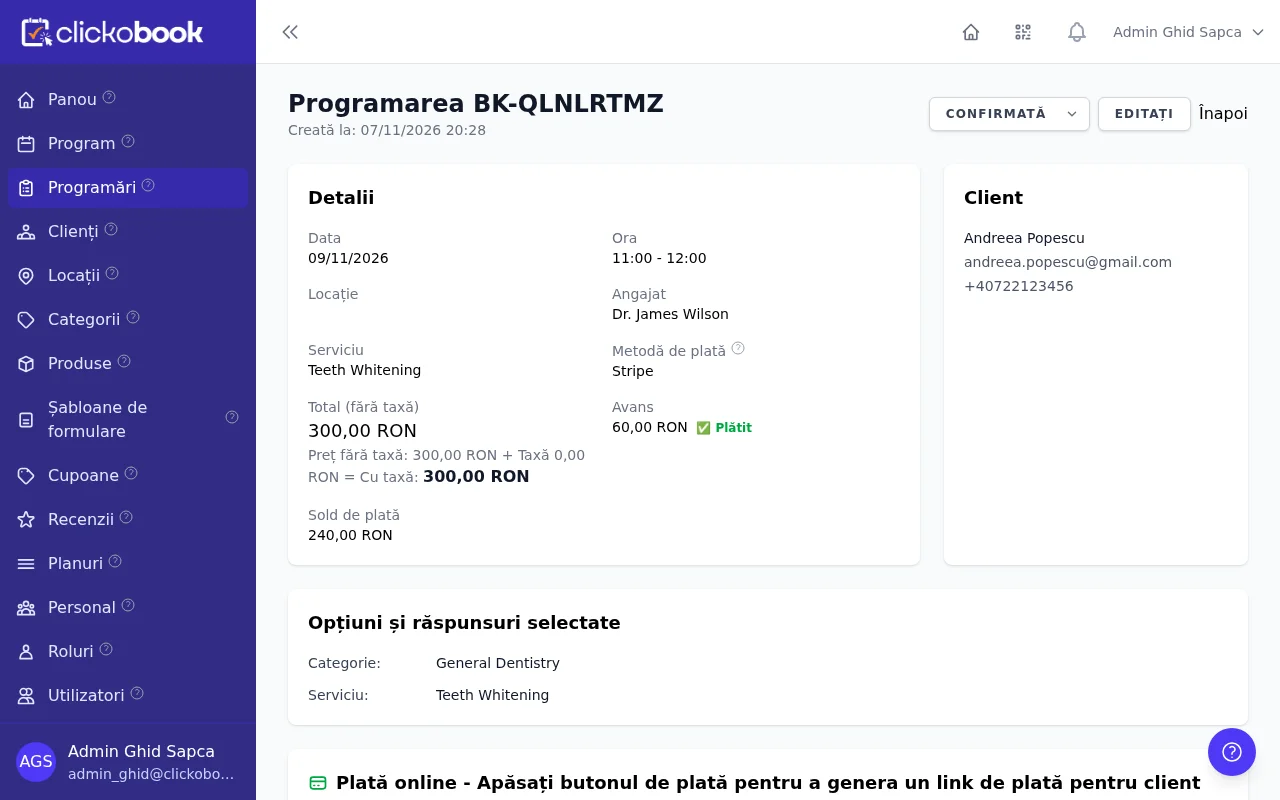
The platform marks the deposit as paid and calculates the exact balance due (`balance_due`). The admin portal displays both the collected deposit and the outstanding amount.
3. In-person cash collection at venue
Upon arrival or after service completion, staff records the cash collected with a single click. The remaining balance resets to zero and the booking is marked complete.
Step-by-step: How to configure deposits in ClickoBook
Setting up deposit requirements takes less than two minutes from your settings panel.
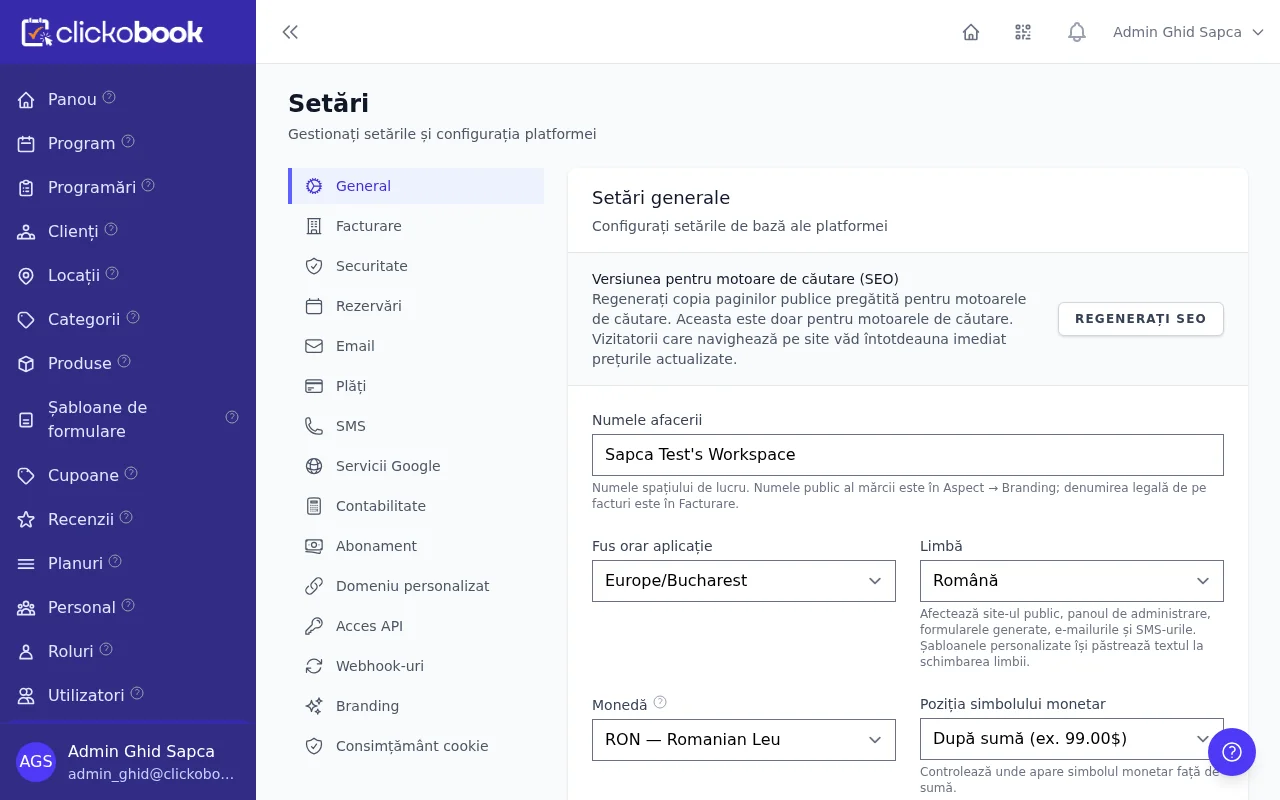
1 Navigate to Settings → Booking
From your ClickoBook administrator sidebar, open Settings and scroll to the Booking section.
2 Enable deposit payments
Toggle on the checkbox "Enable deposit payments for bookings" (`deposit_enabled`).
3 Set deposit type and rate
Choose Percentage (e.g. 20% or 30% of total service cost) or Fixed amount (e.g. $25 per booking).
4 Save your configuration
Click Save changes. The online checkout will now automatically offer the deposit option to all booking visitors.
Best practice: What is the optimal deposit amount?
For most service businesses, a 20% to 30% deposit strikes the perfect balance: it is small enough not to deter bookings, yet substantial enough to ensure attendance.
What clients see on the checkout page
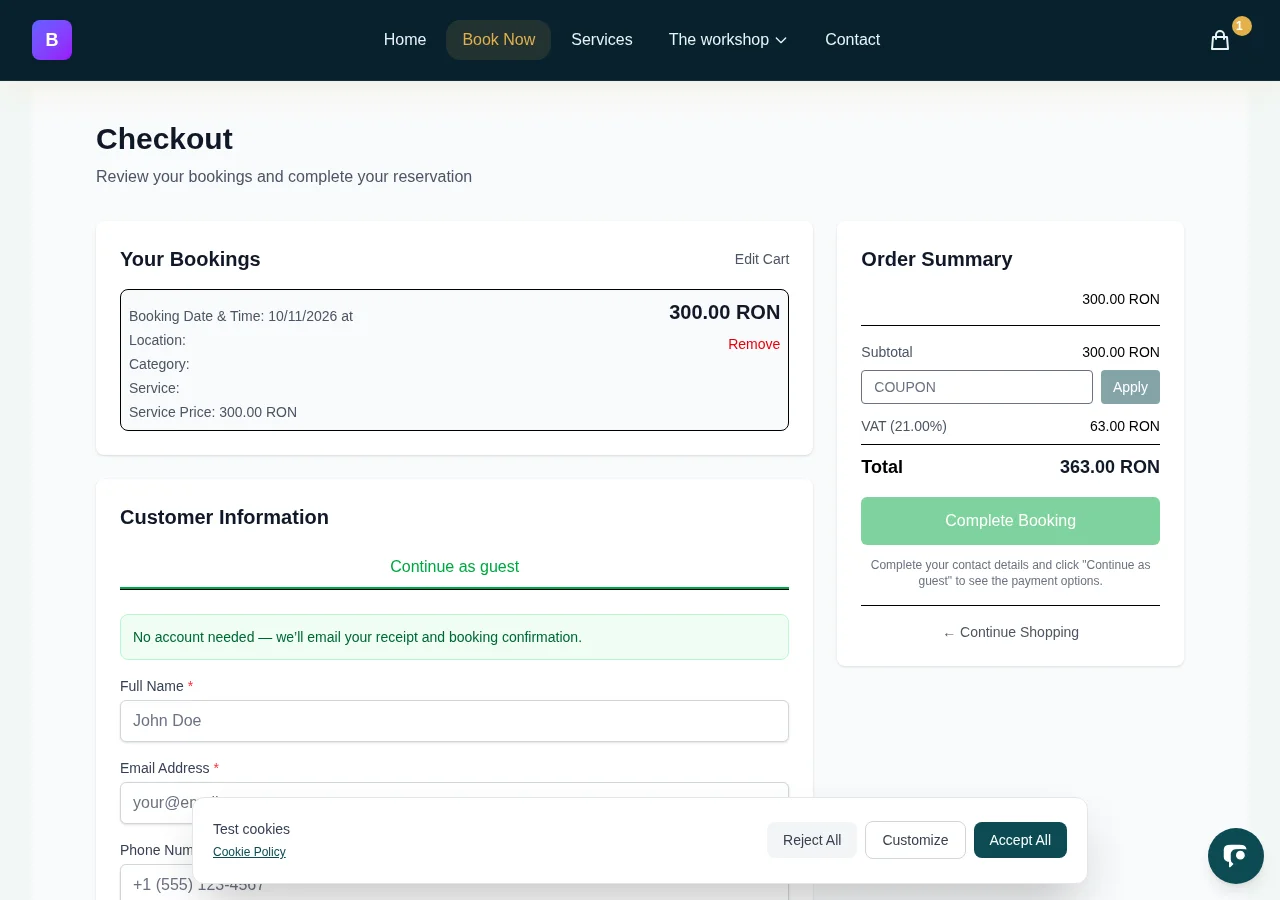
Clear payment breakdowns build trust: clients see exactly what is charged now and what is due in person.
Transparent payment choices
Clients easily toggle between paying a partial deposit now or paying in full using simple radio options.
Automatic breakdown display
The checkout summary highlights total price, card charge today, and a dedicated "Balance to pay later" line.
How to record cash payments at your location
When the client arrives at your desk, recording their cash payment requires only one click.
Best practices for managing hybrid payments
Record cash immediately at the counter
Ensure front desk staff clicks the cash recording button as soon as banknotes are received to keep daily registers balanced.
Publish a transparent cancellation policy
Clearly inform clients on how many hours in advance they may reschedule without forfeiting their deposit.
Add extra charges before collecting cash
If a client adds services or products during their visit, use "+ Add additional charge" before collecting the final cash amount.
Keep distinct accounting records
Having separate transaction records for online card deposits and cash settlements simplifies end-of-month reconciliations.
Frequently asked questions about hybrid payments
Can a client pay the balance online if they forget cash? ▼
Yes. From the booking details screen, staff can generate a secure payment link and send it via SMS, WhatsApp, or email, allowing the client to pay the remainder by card on their phone.
What happens to the deposit if a customer cancels? ▼
The online deposit covers the specialist's reserved time slot. If you choose to refund or issue store credit, you can do so directly from the admin panel.
Can restricted staff members record cash payments? ▼
Yes. Assigned staff can view their own appointments and record cash received from their clients without seeing company-wide revenues.
How are invoices generated for hybrid bookings? ▼
Invoicing integrations (such as Oblio) create the invoice for the total service amount, and reconcile payments against both the online deposit and the cash received.
Can I set different deposit rules for specific services? ▼
Yes. You can configure a default business-wide deposit percentage, and override rules on complex or premium services.
Protect your appointment schedule with hybrid payments
Eliminate no-shows while giving clients the flexibility to pay the balance in cash at your location. Get started with ClickoBook today.