Quote forms that price the job and book it
Stop answering "how much?" with "send us an email". A priced quote form asks the questions that change the job, calculates a live estimate, and turns the visitor into a booked appointment — with a deposit, if you want one.
Pricing, conditional logic and deposits are included in every plan. No commission on payments.
"How much does it cost?" is a buying signal, not a nuisance
Most service websites answer the most important question with a form. The visitor asks for a price, the form collects a name and an email, and then the visitor waits. Sometimes they wait a day. Often they open three more tabs in the meantime and book with whoever answered first.
The phone has the same problem. A call is expensive for both sides: the customer repeats the same six details, the person answering writes them down, and someone promises to call back after checking the diary. For a small job, the cost of quoting can exceed the margin on the work.
What the customer actually wants is not a document. They want to know whether the job is in their budget, how soon it can happen, and what happens next. Those three answers fit in a form — if the form is built around the facts that change the price.
The visitor leaves
A price request with no price is a lead with no commitment. They compare tabs, not offers.
You quote blind
Without structured answers, every quote is a phone call and a guess about the scope.
The diary stays empty
A quote that ends in an email has no slot attached. The booking is a separate conversation that may never happen.
Five steps from a question to a confirmed appointment
A quote form is a sequence, not a page of fields. Each step narrows the price and moves the visitor closer to a decision. When the sequence is right, the customer does the work of qualifying the job without feeling like they are filling in a survey.
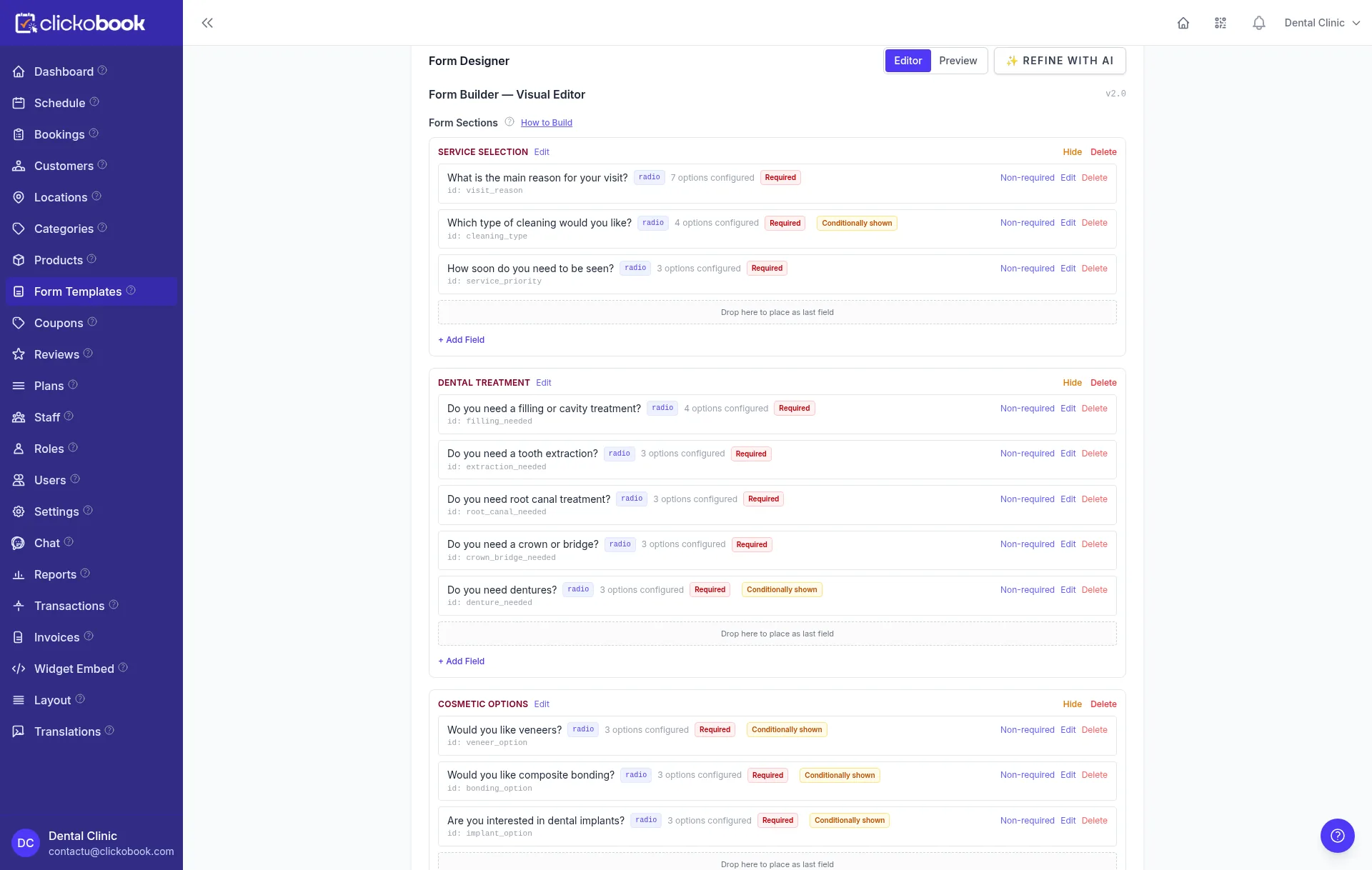
Ask the questions that change the job
Not every detail — the four or five facts that move the number. For a roof that is area, pitch, material and removal. For a clean it is rooms, bathrooms, frequency and add-ons. Everything else can wait for the visit.
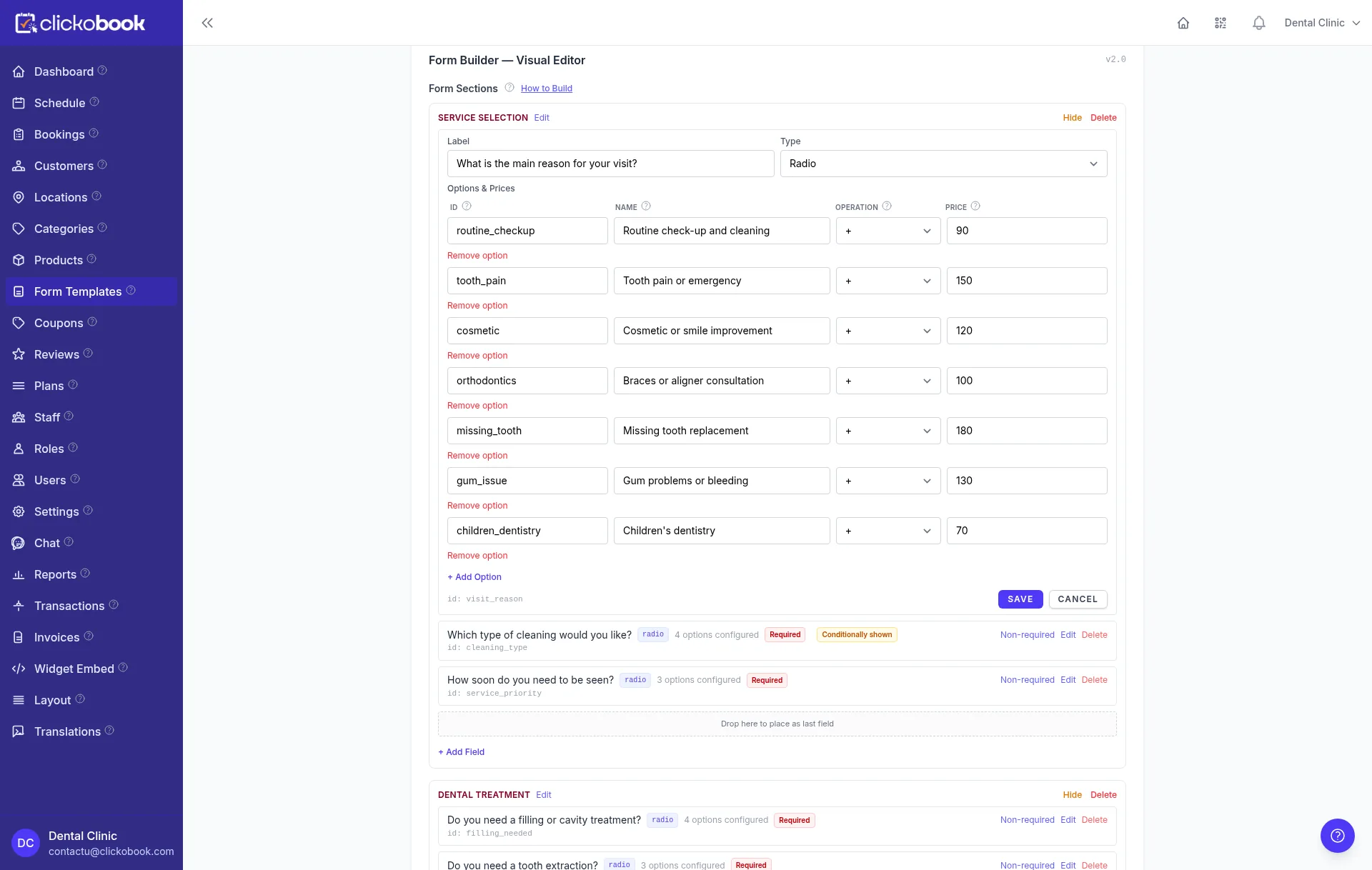
Let each option carry its price rule
Every choice has a consequence: a rate per square metre, a percentage multiplier, a flat fee or a quantity. The customer sees the label, the form applies the number.
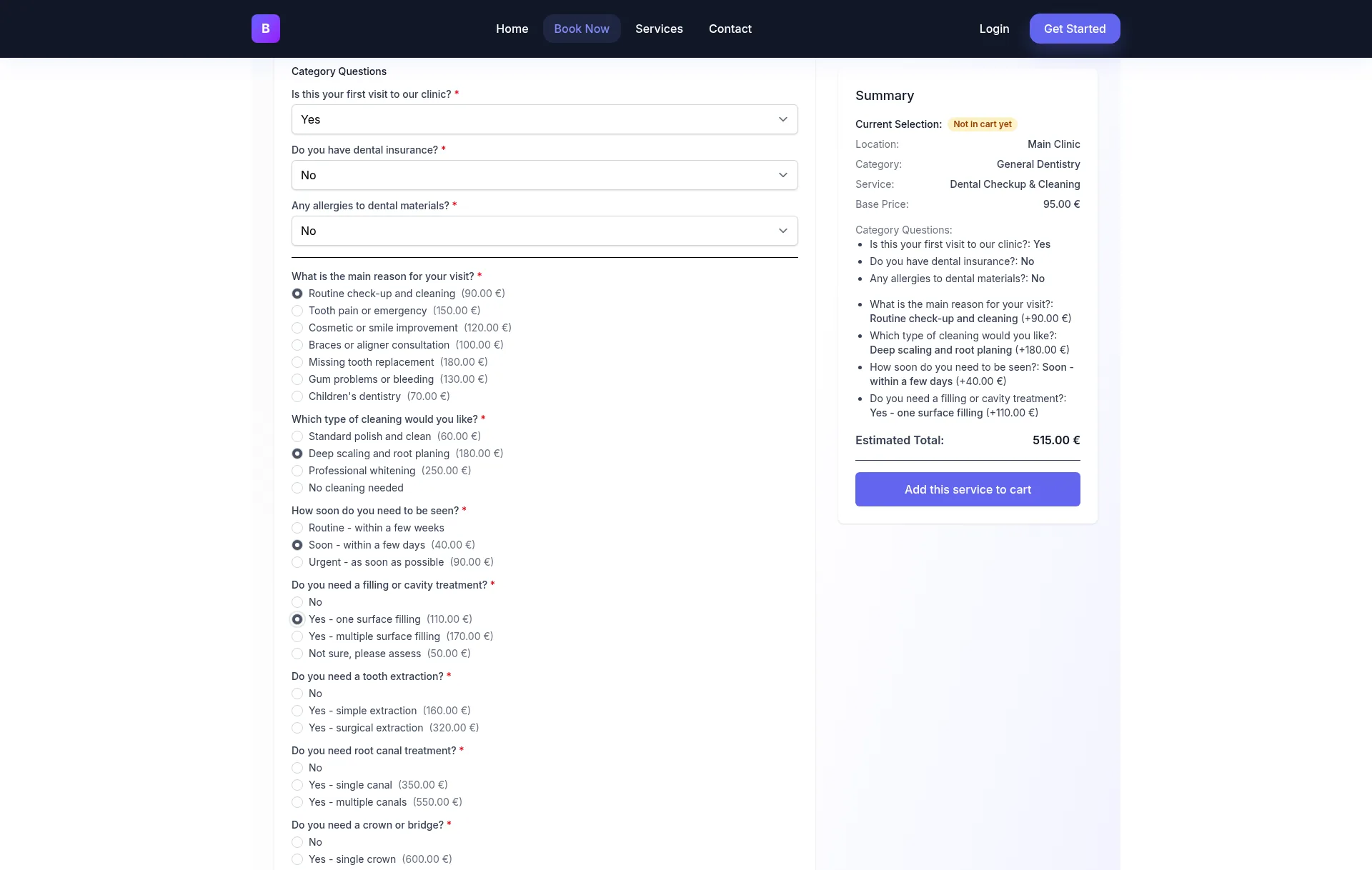
Show the estimate while they answer
A running summary turns the form into a conversation about budget. The customer can remove an add-on and watch the total fall, which makes the quote feel fair instead of arbitrary.
Offer the slot that confirms the scope
The estimate is an estimate. The next step is the inspection, the survey or the visit that locks the number — and it is bookable from the same page, not from a follow-up email.
Take a deposit, or the full amount
A deposit turns a good intention into a commitment, and it funds the visit. A full-payment discount gives the customer a reason to settle now instead of later.
The four rule types behind every quote
Every quote is built from the same four ingredients. Once you can recognise them, you can model almost any service without writing a formula by hand.
Per unit
A rate multiplied by a quantity the customer enters: square metres, hours, rooms, guests or kilometres. The most common rule for trades, cleaning and events.
Example: 120 m² × 45 = 5,400
Percentage
A multiplier applied to the subtotal: steep-pitch uplift, weekend surcharge, frequency discount or full-payment discount. Percentages keep the rule proportional as the job grows.
Example: steep pitch adds 25% to the material subtotal
Flat
A fixed amount for a discrete extra: an oven clean, a packing service, a call-out, a piano. Flat fees are easy to explain and easy for the customer to accept.
Example: packing service +180
Conditional
A rule that only applies when an earlier answer is true: no elevator means a floor fee, a slab leak means a diagnostic visit, a first clean means deep-clean pricing.
Example: floor fee applies only when there is no elevator
Order matters
Apply quantity and flat extras first, percentages to the subtotal they describe, and discounts last. A frequency discount applied before add-ons gives a different (and usually wrong) total from the same numbers applied in the other order. Decide the order once, document it in the form description, and use it in every template.
Six jobs, six different field sets
The rule types are universal; the questions are not. A roofing form that asked about bedrooms would be as wrong as a cleaning form that asked about roof pitch. These six examples show how the same engine changes shape with the work.
Roofing
Area × material rate, adjusted by pitch, plus removal, access and roof features. The final figure depends on measurements, so the form offers a range and books the inspection.
TemplateCleaning
Rooms and bathrooms form the base, frequency applies a discount, add-ons price the extras. The recurring option is the point: a weekly client is worth more than four one-off visits.
TemplateMoving
A transport base plus distance, rooms and floor access, with packing and large items on top. Elevators and distance change which questions are relevant at all.
IndustryDental care
A base consultation plus priced treatments. The patient sees the cost of the options before the visit, and the deposit secures the chair time.
IndustryAutomotive repair
Vehicle, symptom and service drive a diagnostic fee and an estimated repair range. A conditional rule sends complex symptoms to a diagnostic appointment instead of a firm price.
IndustryEvents & hospitality
Guests × per-person rate, plus venue extras and date-dependent pricing. The deposit is what holds the date while the menu is confirmed.
Notice what the six have in common: each form asks only for facts the customer already knows, and each one states what still needs a human. That combination is what makes the estimate credible. The template hub lists the exact fields and rules for every full template, so you can rebuild one without guessing.
What a quote form is not
A quote form is a pricing and booking step, not a proposal suite. Being explicit about the boundary saves you from buying the wrong tool and saves your customer from expecting a document that never arrives.
Not a PDF proposal
There is no generated PDF, branded proposal or approval page. The quote lives in the form and the booking record.
Not an e-signature workflow
Acceptance is a booking, not a signature. If you need a signed contract, use your document tool for that step.
Not a takeoff or blueprint measurement
The customer enters the area. The platform does not measure a floor plan or calculate materials from drawings.
Not a quote-only inbox
A quote is a bookable service. If you only want to collect enquiries, a plain form is cheaper — and this page is not pretending otherwise.
What it does do is narrow and honest: it prices the countable parts, shows the assumptions, books the step that confirms them, and optionally takes a deposit. For most service businesses that is the entire commercial conversation, without a single attachment.
From a description to a published quote form
Clickobook builds the first draft from a plain-language description, then leaves every rule editable. You do not need to choose a template before you start — but starting from a known field set is usually faster than inventing one.
1. Describe the job
Say what you sell and what changes the price. "Roof replacement priced per square metre by material, with pitch and removal" is enough to generate a structured first draft.
2. Check the rules
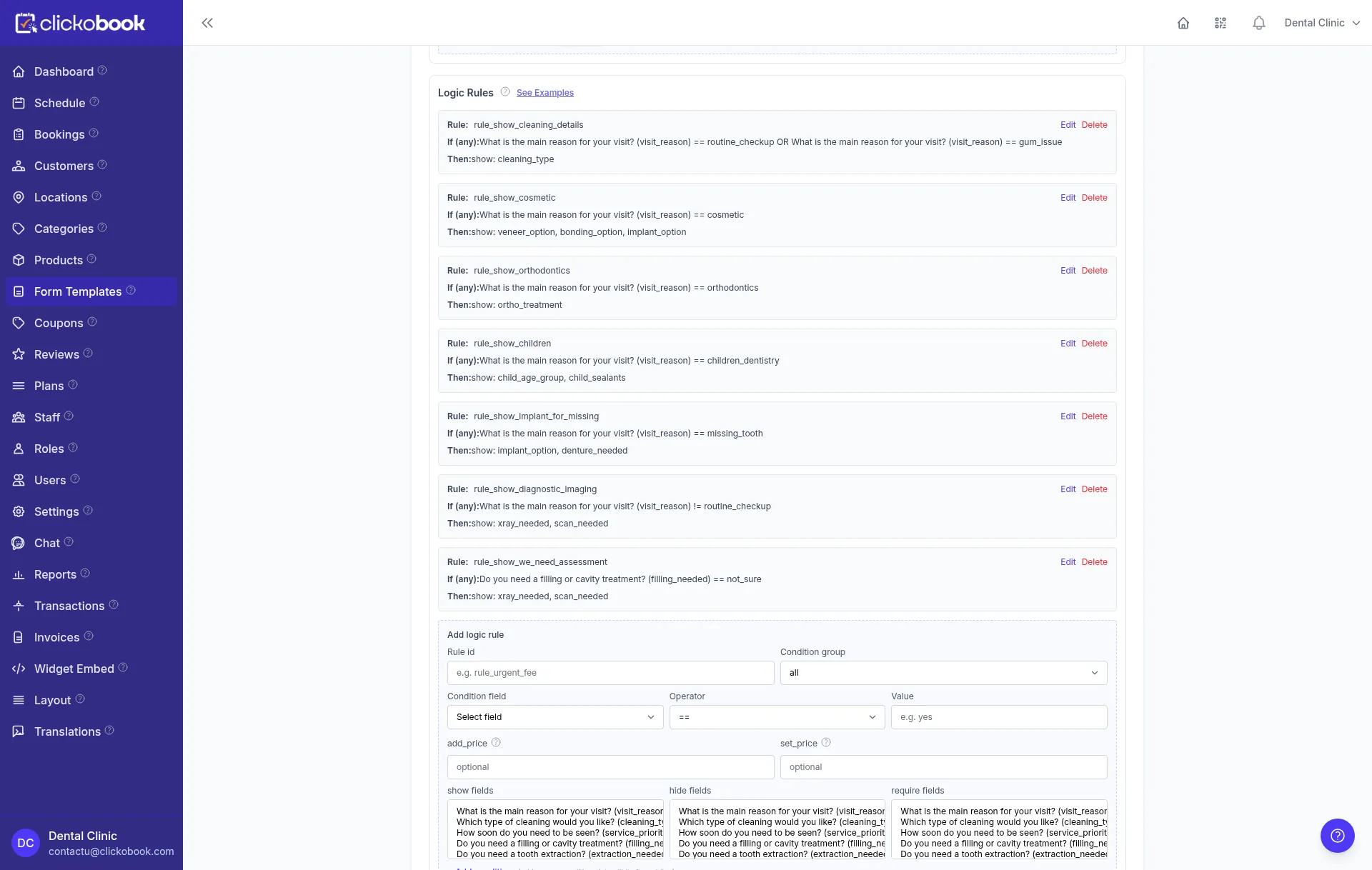
Open each option and confirm its operation and amount. Add the conditional rules that hide irrelevant questions or change the price. This is the step that makes the estimate yours.
3. Publish and embed
Publish the service, then share the booking page or embed the widget on your site. The same form powers the public page, the widget and the chat assistant.
Want the exact field lists?
The template hub gives you the fields, option prices, conditional logic and rebuild order for roofing, cleaning and moving.
Quote forms — frequently asked questions
A quote form is a short online interview that collects the facts that change the price of a job — area, rooms, distance, material, urgency — and turns them into a live estimate. Unlike a contact form, it shows the visitor a number before they submit, so the first conversation starts from an agreed range instead of "please send us your details".
A booking form reserves a slot for a service whose price is already known. A quote form prices work whose scope varies, and then offers a slot once the price is clear. On Clickobook they are the same form engine: a quote is simply a bookable service whose options carry prices, so the visitor can estimate the job and confirm an appointment in one flow.
Yes. Every priced option and every per-unit field recalculates the running total as the customer changes an answer. The summary shows the base price, each add-on and the estimated total, so there is no surprise at the end of the form.
A number field can act as a quantity. The customer enters square metres, hours, rooms, kilometres or guests, and the form multiplies that quantity by the rate attached to the selected option. You set the rate once per option instead of writing a price for every possible size.
Yes. Conditional rules show or hide questions, and can change the price, based on earlier answers. For example, asking for the number of skylights only when the customer is replacing the whole roof, or removing the floor fee when both addresses have an elevator.
No — and that is deliberate. Clickobook does not generate PDF proposals, approval workflows or e-signatures. The quote lives in the form and in the booking record, and the next step is an appointment with a deposit, not a document waiting for a signature. If your process legally requires a signed proposal, keep that step in your existing document tool.
Yes. After the estimate, the customer picks an available slot and can pay a deposit or the full amount at checkout through Stripe or PayPal. You choose the deposit type (percentage or fixed), and you can offer a discount when the customer pays in full.
It should not pretend to. A form can price the countable parts of a job, but a roof measured from a footprint, a wall that may be load-bearing or a move with a narrow staircase still needs eyes. The good pattern is to show a range, state the assumptions, and make the inspection or survey the next bookable step.
Go deeper on quoting
The pricing guide explains the rule types, the deposit guide covers the hand-off to a booking, and each industry page shows the workflow in context.
Put a price on the work — and the slot on the calendar
Build your first quote form with Clickobook and connect it to bookings, deposits and reminders. Start your 14-day free trial.
Free plan starts with no card · Paid plans do not require card at signup for trial · Cancel anytime