From Instant Quote to Booked Appointment — and the Deposit
The most expensive step in a service business is the gap between "here is your price" and "you are booked". This is how to close it in one flow, without a PDF, an approval step or a follow-up email.
A quote that does not end in a booking is a lead. It may be a good lead, but it still needs a second conversation, a second visit to the website, and a second decision from the customer — and every one of those is a place where the job is lost.
The fix is not a better follow-up email. It is removing the hand-off entirely: the same page that prices the job should take the slot and the deposit, while the customer is still looking at the number that convinced them.
The gap between quote and booking
In a typical setup the customer fills a quote form, receives an email, reads it later, replies with a question, gets a call, agrees a date — and only then books. Three tools and five days later, the job is confirmed. The problem is not the length; it is that each step asks the customer to care again.
What the gap costs
- · The visitor leaves without a number, or with a number that arrives after they have already called a competitor.
- · The same answers are typed twice — once in the quote form, once in the booking form — and never quite match.
- · The slot is not reserved while the quote is pending, so the date the customer wanted is gone when they say yes.
- · Nobody can tell which quotes became bookings, so pricing decisions are made on intuition.
The quote form in the pricing workflow is designed to close that gap: it produces the number, and the same session continues into the slot and the deposit.
One flow, five steps
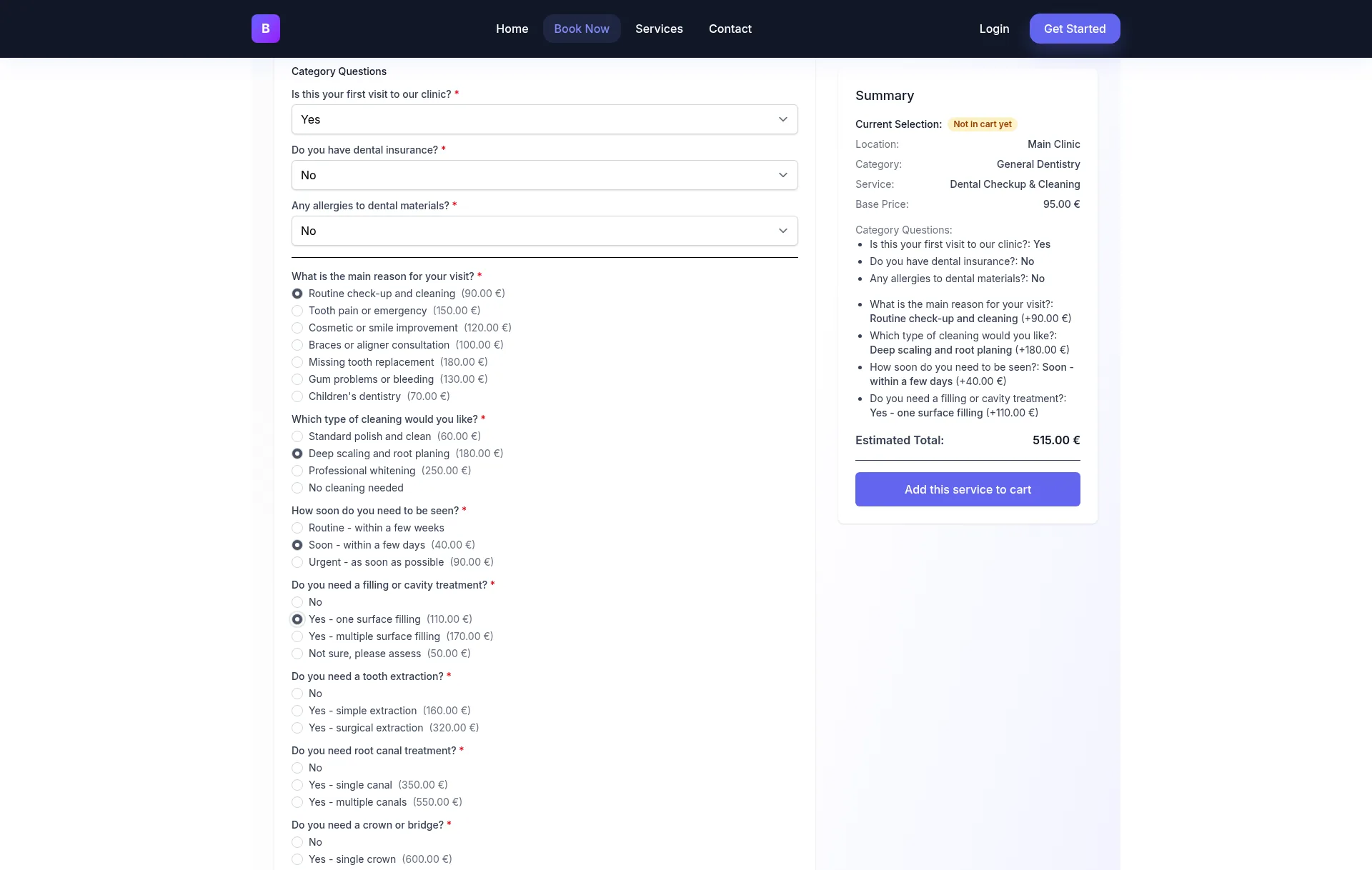
The customer answers the questions that change the price
Area, rooms, distance, frequency, access — the same facts you would ask on the phone. Each question is short and only appears when it applies.
The form calculates a total
Per-unit rates, difficulty multipliers, flat fees and discounts apply in a fixed order. The visitor sees the number before being asked for anything else.
The visitor picks a slot
Availability comes from the same schedule the team uses, so the slot offered is a slot that can actually be served. Duration can follow the answers — a larger job blocks a longer visit.
The deposit is taken at checkout
A percentage or a fixed amount, processed by Stripe or PayPal, with the balance recorded against the booking. The payment is the commitment, not the email.
Both sides receive a confirmation
The customer gets the date, the total, what they paid and what remains. The team sees the booking, the answers and the calculated price in one record — no retyping.
The pricing rules behind step 2 are covered in the dynamic pricing guide. Step 4 follows the same deposit mechanics used on any booking page — percentages, fixed amounts and the optional full-payment discount.
What the customer sees
A flow that feels long is a flow with invisible progress. The customer should always be able to answer three questions: what am I being asked, what does it cost so far, and what happens next.
Before the first answer
A clear title, the service and the fact that a price follows. No account required.
While answering
A running total that changes with each priced answer, and no question that does not affect it.
At the slot
Real availability, the duration implied by the answers, and the deposit that confirms the date.
After payment
One confirmation with the date, the total, the deposit paid and the balance still due.
The deposit is part of the quote, not an afterthought
A deposit converts a priced page into a commitment. How much to take depends on what an empty slot costs you:
Percentage deposit
25–50% of the total. Common for clinics, tattoo studios and high-value treatments, where a missed slot is expensive to refill.
Fixed deposit
A booking fee that covers the visit or the admin work, independent of the final total. Easier to explain when the quote is a range.
Full-payment discount
Pay in full at booking and get a discount — the same mechanic as a percentage deposit, expressed as an incentive instead of a condition.
State the refund rule on the page
Whether the deposit is refundable, and until when, belongs next to the price. A deposit without a stated cancellation rule produces the same dispute as a hidden extra — the customer agreed to a number, not to a condition they discover later.
The deposits guide covers the payment side in detail: balances, refunds, additional charges and the full-payment discount.
Why there is no PDF and no approval step
Many quoting tools are built around a document: fill a form, generate a PDF, send it, wait for a signature, then book. That model exists because the document was once the only way to carry a price between two systems. On a booking platform it creates two failure points — the document can be edited after the fact, and the approval can happen days after the slot was available.
Clickobook does not generate PDF proposals, approval workflows or electronic signatures. What it does instead: the priced form is the quote, the checkout is the acceptance, and the booking record is the confirmation both sides can open at any time. A customer who wants a document can print the confirmation page.
That is the honest boundary. If your work requires a signed contract — structural work, regulated treatments, large commercial jobs — keep that step in your existing process. Use the form to price the job and book the survey, and let the contract follow. Do not pretend a quote form replaces a legal document, and do not hide the limitation from the customer.
When the quote must stay a survey
If the measurements decide the price and the customer cannot provide them, the priced form should switch to "book a survey" above a threshold. The booking still happens online; only the number waits for the visit. That is a better outcome than a form that guesses and an invoice that corrects.
Four ways the hand-off still breaks
Asking for payment before showing the price
The deposit is the last step, not the first. A form that asks for a card before the total is visible reads as a lead-capture trick.
A deposit on a number you will change
If the quote is an estimate, take the deposit on the lower bound or as a fixed fee, and say what the survey can change.
No validity window
Material prices move. State how long the quote holds — or make it clear the total is confirmed at booking.
Two systems, two answers
A quote tool that does not know the calendar will promise a date the booking tool cannot serve. Keep the quote, the slot and the deposit on one record.
The hand-off checklist
- The total is visible before the customer is asked for contact details or payment.
- The slot offered comes from the same availability the team uses.
- The deposit amount and the refund rule are stated next to the price.
- The confirmation shows the total, the deposit paid and the balance due.
- The team sees the answers and the calculated price on the booking, without retyping.
- Jobs that need measurements above a threshold switch to a survey instead of a guessed price.
Frequently asked questions
See the hand-off inside real booking pages
Each industry page shows the quote, the slot and the deposit working together.
Close the gap between quote and booking
Price the job, reserve the slot and take the deposit on one page — then let the confirmation do the follow-up.